
How to configure DNS at Cloudflare for Webcentral Managed WordPress
Learn how to configure DNS settings at Cloudflare for Webcentral Managed Hosting for WordPress.
This article describes how to configure DNS settings at Cloudflare for a Webcentral Managed WordPress site.
Configuring DNS settings at Cloudflare To configure DNS settings for your domain at Cloudflare, follow these steps:
- Log in to the Hosting Panel at https://theconsole.webcentral.au/
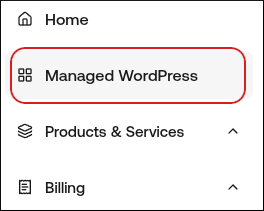
- In the left sidebar, click Managed WordPress:
- On the My Websites page, locate the site, and then click Manage:

- In the Ready to go live? section, click Get Started:

- In the Change Domain Name section, type the domain you want to use with WordPress:
-
If you want to use the base domain name, type example.com where example.com represents your apex domain.
-
If you want to use the www subdomain, type www.example.com where example.com represents your apex domain.
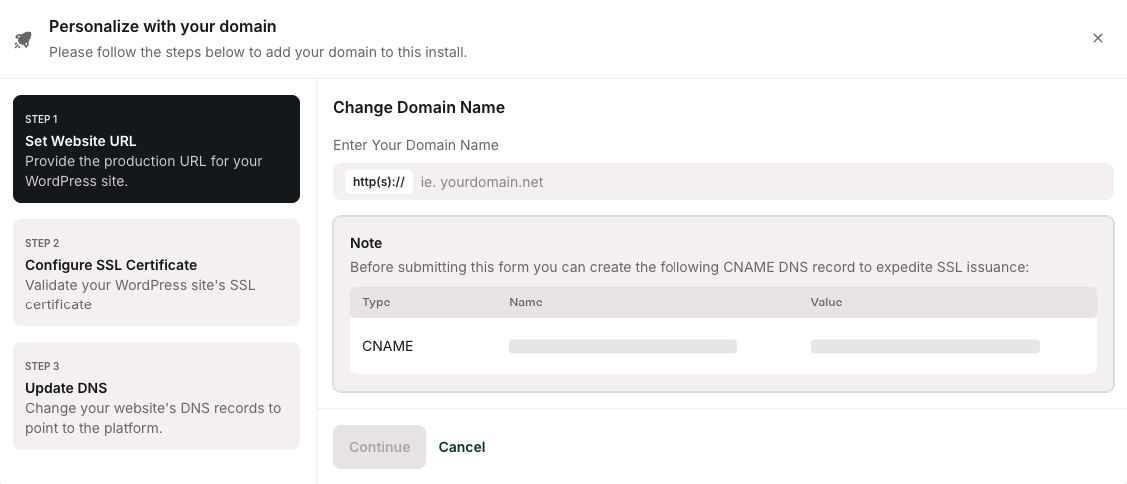
- Click Continue.
- In the Configure SSL section, copy the values for the two TXT records.
- Log in to your Cloudflare account .
- Click the Domain you want to change DNS for, and then click DNS:

- Create the two TXT records required for your SSL certificate that you obtained in step 7:
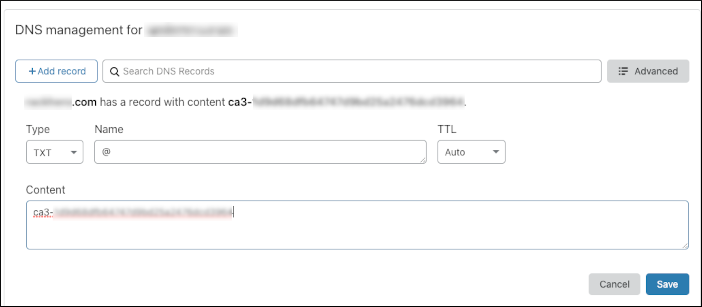
- After you create the TXT records in Cloudflare, navigate to your site and confirm they’ve been created.
- On the Webcentral dashboard, in the Configure SSL section, click Continue to proceed to the Step 3: Update DNS section.
- Copy the DNS records shown, and then create the DNS records in Cloudflare to point your domain to Webcentral
- That’s it! Your domain is now pointing to us.
*Frequently Asked Questions
Will I need to manually copy all of my DNS settings to Cloudflare? No. Cloudflare finds all of your DNS settings and clones them automatically.
Doesn’t Webcentral provide Cloudflare? We provide the Cloudflare Enterprise CDN, but your domain's DNS settings must be managed in your own private Cloudflare account.
**Are there any costs or fees involved? **No, Cloudflare provides DNS services at no cost.