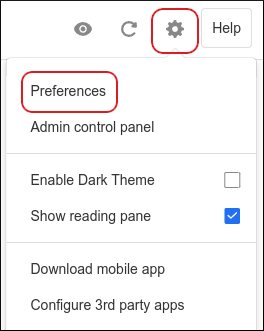
Click the Settings (gear) icon, and then click Preferences:
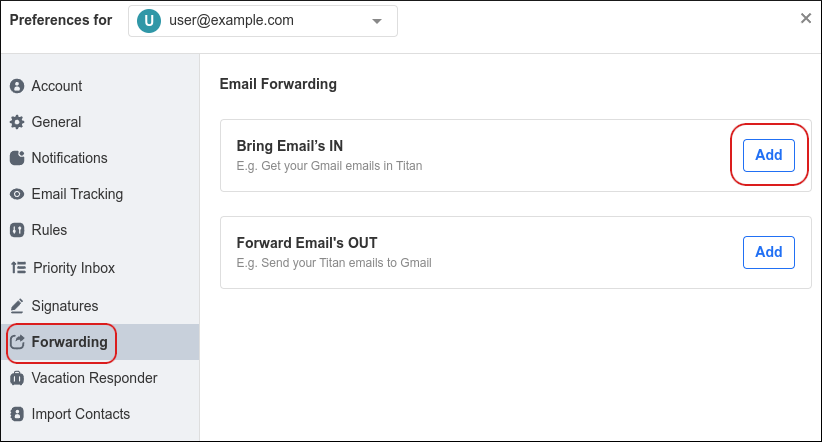
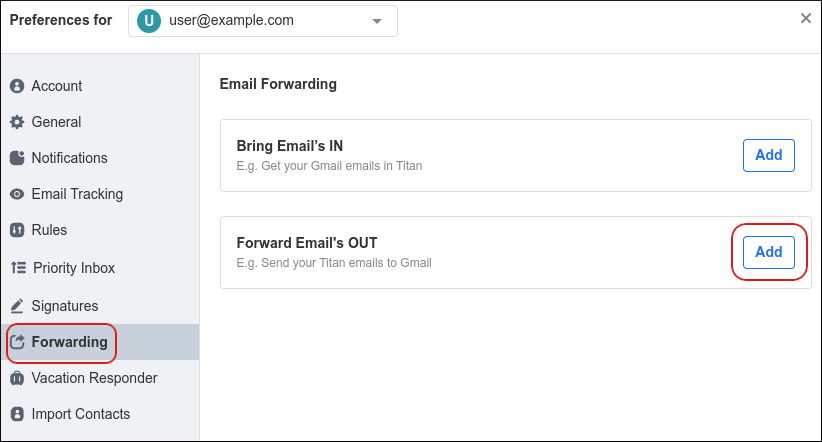
Click Forwarding, and then in the Forward Emails OUT section, click Add:
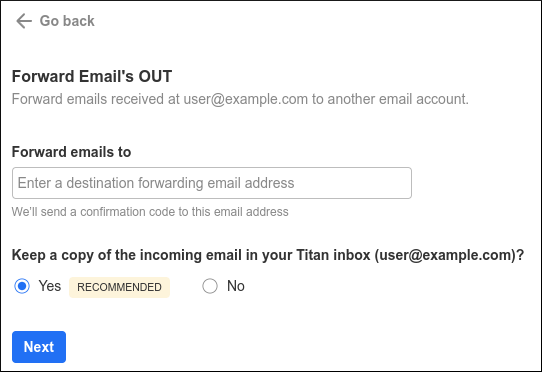
In the Forward emails to text box, type the destination Gmail address:
To keep a copy of forwarded messages in your inbox, click Yes. Otherwise, click No.
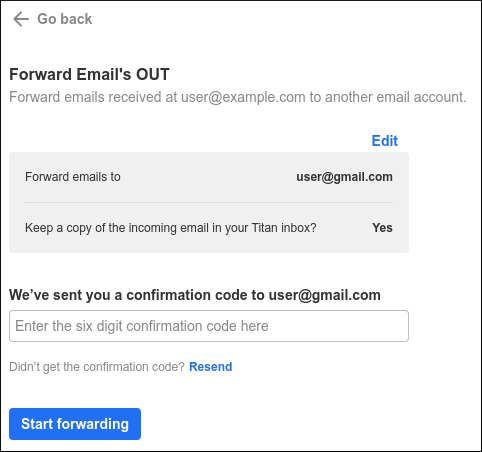
Click Next. You should receive a message with a confirmation code at the Gmail account. Type the confirmation code in the text box, and then click Start forwarding:
If you do not receive the code at your Gmail account, click Resend.
Email forwarding to Gmail is now configured. To disable forwarding to Gmail at any time, click Stop forwarding.
{"docsConfig":{"theme":"mint","$schema":"https://mintlify.com/docs.json","name":"Webcentral","description":"Webcentral support and self-help guides.","colors":{"primary":"#018ffd","light":"#4c9cfc","dark":"#122e4a"},"logo":{"light":"https://mintcdn.com/web-central/QKpfFDR3nHMzBirj/logo/light.svg?fit=max\u0026auto=format\u0026n=QKpfFDR3nHMzBirj\u0026q=85\u0026s=cc74808e1f9698514f0b55a32d5d24b5","dark":"https://mintcdn.com/web-central/eDyreczjgcP0xqMJ/logo/dark.svg?fit=max\u0026auto=format\u0026n=eDyreczjgcP0xqMJ\u0026q=85\u0026s=dddaddb9e3b9ff69e1a7709e6c109343"},"favicon":{"light":"https://mintcdn.com/web-central/3ROZqs-PdzmZ-kxW/images/4452_1_13213_120x120.svg?fit=max\u0026auto=format\u0026n=3ROZqs-PdzmZ-kxW\u0026q=85\u0026s=8338f5c12a72b37b4b32b9ef05bae1ca","dark":"https://mintcdn.com/web-central/3ROZqs-PdzmZ-kxW/images/4452_1_13213_120x120.svg?fit=max\u0026auto=format\u0026n=3ROZqs-PdzmZ-kxW\u0026q=85\u0026s=8338f5c12a72b37b4b32b9ef05bae1ca"},"navbar":{"links":[{"href":"https://webcentral.au/about/support","label":"Contact Us"},{"href":"https://status.webcentral.au/","label":"Service Status"}],"primary":{"type":"button","label":"My Account","href":"https://theconsole.webcentral.au/"}},"footer":{"socials":{"x":"https://twitter.com/webcentralau","facebook":"https://www.facebook.com/webcentralau","youtube":"https://www.youtube.com/channel/UCbQiG4GIey8eDVGs1ozQggQ"}},"contextual":{"options":["copy","view","chatgpt","claude","perplexity","mcp","cursor","vscode"],"display":"header"},"styling":{"latex":false},"navigation":{"pages":[]}},"deployment":{"deploymentMetadataValue":{"subdomain":"web-central","hasAudioNarration":false,"actualSubdomain":"web-central","customDomains":["support.webcentral.au"],"gitSource":{"type":"github","owner":"panaras10","repo":"webcentralknowledgebase","deployBranch":"main","contentDirectory":"","isPrivate":true,"mountPath":"","label":""},"chroma":{"collectionId":"50a904c9-7e31-4302-99a9-a34da6835ecc","liveDeploymentHistoryId":"6ab231ba75d95d11798f3ade","schemaVersion":"v3","latestBuiltDeploymentHistoryId":"6ab231ba75d95d11798f3ade"},"entitlements":{},"buildId":"6ab231ba75d95d11798f3ade","clientVersion":"0.0.4067","searchFilterCounts":[{"language":"default","tag":"Websites \u0026 Hosting","count":75},{"language":"default","tag":"Emails","count":64},{"language":"default","tag":"Managed hosting for WordPress powered by Rocket.net","count":63},{"language":"default","tag":"General Information","count":24},{"language":"default","tag":"Accounts and Billing","count":23},{"language":"default","tag":"Domains","count":23},{"language":"default","tag":"Titan Mail","count":18},{"language":"default","tag":"Plesk","count":17},{"language":"default","tag":"cPanel","count":15},{"language":"default","tag":"OX Mail","count":13}]},"assistantConfig":{"enableAskAiButton":false,"enableStarterQuestions":false,"enableContextualStarterQuestions":false,"enableAskAiSearchBar":true},"basePath":"","hasChatPermissions":false,"hasWebMcpPermissions":false,"toggles":[],"googleFontsInlined":false},"customCss":[],"page":{"pagePath":"emails/titan-mail/integrating-titan-mail-accounts-with-gmail","slug":"/emails/titan-mail/integrating-titan-mail-accounts-with-gmail","pageMetadata":{"title":"Integrating Titan Mail accounts with Gmail","description":"You can configure Titan Mail accounts to import messages from a Gmail account, and forward messages to a Gmail account. This article shows you how.","href":"/emails/titan-mail/integrating-titan-mail-accounts-with-gmail"},"description":{"compiledSource":"\"use strict\";\nconst {jsx: _jsx} = arguments[0];\nconst {useMDXComponents: _provideComponents} = arguments[0];\nfunction _createMdxContent(props) {\n const _components = {\n p: \"p\",\n ..._provideComponents(),\n ...props.components\n };\n return _jsx(_components.p, {\n children: \"You can configure Titan Mail accounts to import messages from a Gmail account, and forward messages to a Gmail account. This article shows you how.\"\n });\n}\nfunction MDXContent(props = {}) {\n const {wrapper: MDXLayout} = {\n ..._provideComponents(),\n ...props.components\n };\n return MDXLayout ? _jsx(MDXLayout, {\n ...props,\n children: _jsx(_createMdxContent, {\n ...props\n })\n }) : _createMdxContent(props);\n}\nreturn {\n default: MDXContent\n};\n","frontmatter":{},"scope":{}},"pageType":"default","mdx":{"mdxSource":{"compiledSource":"\"use strict\";const{Fragment:_Fragment,jsx:_jsx,jsxs:_jsxs}=arguments[0];const{useMDXComponents:_provideComponents}=arguments[0];function _createMdxContent(props){const _components={a:`a`,img:`img`,li:`li`,ol:`ol`,p:`p`,strong:`strong`,ul:`ul`,..._provideComponents(),...props.components},{Heading,Note,Warning}=_components;if(!Heading)_missingMdxReference(`Heading`,true);if(!Note)_missingMdxReference(`Note`,true);if(!Warning)_missingMdxReference(`Warning`,true);return _jsxs(_Fragment,{children:[_jsx(_components.p,{children:`This article describes how to configure Titan Mail accounts to:`}),`\n`,_jsxs(_components.ul,{children:[`\n`,_jsx(_components.li,{children:`Import messages from a Gmail account.`}),`\n`,_jsx(_components.li,{children:`Forward messages to a Gmail account.`}),`\n`]}),`\n`,_jsx(_components.p,{children:`By configuring these settings, you can integrate your Titan Mail accounts with your Gmail accounts.`}),`\n`,_jsx(Heading,{level:`2`,id:`importing-messages-from-a-gmail-account`,children:`Importing messages from a Gmail account`}),`\n`,_jsx(_components.p,{children:`You can import messages from a Gmail account. When you do this, all new messages are received in your Titan Mail account.`}),`\n`,_jsx(Warning,{children:_jsx(_components.p,{children:`When you send, delete, or archive an imported message in your Titan Mail account, the message in Gmail itself is unaffected.`})}),`\n`,_jsx(_components.p,{children:`To import your messages from a Gmail account, follow these steps:`}),`\n`,_jsxs(_components.ol,{children:[`\n`,_jsxs(_components.li,{children:[`Log in to your Titan Mail account at `,_jsx(_components.a,{href:`https://webmail.webcentral.au/`,children:`https://webmail.webcentral.au/`})]}),`\n`,_jsxs(_components.li,{children:[`Click the `,_jsx(_components.strong,{children:`Settings`}),` (gear) icon, and then click `,_jsx(_components.strong,{children:`Preferences`}),`:\n`,_jsx(_components.img,{src:`https://static.hosting.com/kb/kb-proemail-webmail-settings-preferences.png`,alt:``})]}),`\n`,_jsxs(_components.li,{children:[`Click `,_jsx(_components.strong,{children:`Forwarding`}),`, and then in the `,_jsx(_components.strong,{children:`Bring Emails IN`}),` section, click `,_jsx(_components.strong,{children:`Add`}),`:\n`,_jsx(_components.img,{src:`https://static.hosting.com/kb/kb-proemail-webmail-settings-forwarding-import.png`,alt:``})]}),`\n`,_jsxs(_components.li,{children:[`In the `,_jsx(_components.strong,{children:`Bring from Gmail`}),` section, click `,_jsx(_components.strong,{children:`Add`}),`:\n`,_jsx(_components.img,{src:`https://static.hosting.com/kb/kb-proemail-webmail-settings-importing-config-1.png`,alt:``})]}),`\n`,_jsxs(_components.li,{children:[`Click `,_jsx(_components.strong,{children:`Add Gmail account`}),`:\n`,_jsx(_components.img,{src:`https://static.hosting.com/kb/kb-proemail-webmail-settings-importing-config-2.png`,alt:``}),`\n`,_jsx(Note,{children:_jsxs(_components.p,{children:[`If you also want to import your Gmail contacts, select the `,_jsx(_components.strong,{children:`Also bring contacts to get recipient suggestions`}),` check box.`]})}),`\n`]}),`\n`,_jsxs(_components.li,{children:[`Click `,_jsx(_components.strong,{children:`Continue`}),`.`]}),`\n`,_jsxs(_components.li,{children:[`Click the Gmail account to import, select all of the check boxes, and then click `,_jsx(_components.strong,{children:`Continue`}),`.`]}),`\n`,_jsxs(_components.li,{children:[`When the import is complete, you receive a `,_jsx(_components.strong,{children:`Your Gmail folder is ready!`}),` message. Click `,_jsx(_components.strong,{children:`Got it`}),`.`]}),`\n`,_jsxs(_components.li,{children:[`In the left sidebar, click the Gmail account to access it:\n`,_jsx(_components.img,{src:`https://files.readme.io/443eeeef18438531ca0fdc9407e1fa3ab134d3fa47dc3ce39ef00ec7f2dbcc34-image.png`,alt:``})]}),`\n`]}),`\n`,_jsx(Heading,{level:`2`,id:`forwarding-messages-to-a-gmail-account`,children:`Forwarding messages to a Gmail account`}),`\n`,_jsx(_components.p,{children:`To forward your messages to a Gmail account, follow these steps:`}),`\n`,_jsxs(_components.ol,{children:[`\n`,_jsxs(_components.li,{children:[`Log in to your Titan Mail account at `,_jsx(_components.a,{href:`https://webmail.webcentral.au/`,children:`https://webmail.webcentral.au/`})]}),`\n`,_jsxs(_components.li,{children:[`Click the `,_jsx(_components.strong,{children:`Settings`}),` (gear) icon, and then click `,_jsx(_components.strong,{children:`Preferences`}),`:\n`,_jsx(_components.img,{src:`https://static.hosting.com/kb/kb-proemail-webmail-settings-preferences.png`,alt:``})]}),`\n`,_jsxs(_components.li,{children:[`Click `,_jsx(_components.strong,{children:`Forwarding`}),`, and then in the `,_jsx(_components.strong,{children:`Forward Emails OUT`}),` section, click `,_jsx(_components.strong,{children:`Add`}),`:\n`,_jsx(_components.img,{src:`https://static.hosting.com/kb/kb-proemail-webmail-settings-forwarding-export.png`,alt:``})]}),`\n`,_jsxs(_components.li,{children:[`In the `,_jsx(_components.strong,{children:`Forward emails to`}),` text box, type the destination Gmail address:\n`,_jsx(_components.img,{src:`https://static.hosting.com/kb/kb-proemail-webmail-settings-forwarding-config-1.png`,alt:``})]}),`\n`,_jsxs(_components.li,{children:[`To keep a copy of forwarded messages in your inbox, click `,_jsx(_components.strong,{children:`Yes`}),`. Otherwise, click `,_jsx(_components.strong,{children:`No`}),`.`]}),`\n`,_jsxs(_components.li,{children:[`Click `,_jsx(_components.strong,{children:`Next`}),`. You should receive a message with a confirmation code at the Gmail account. Type the confirmation code in the text box, and then click `,_jsx(_components.strong,{children:`Start forwarding`}),`:\n`,_jsx(_components.img,{src:`https://static.hosting.com/kb/kb-proemail-webmail-settings-forwarding-config-2.png`,alt:``}),`\n`,_jsx(Note,{children:_jsxs(_components.p,{children:[`If you do not receive the code at your Gmail account, click `,_jsx(_components.strong,{children:`Resend`}),`.`]})}),`\n`]}),`\n`,_jsxs(_components.li,{children:[`Email forwarding to Gmail is now configured. To disable forwarding to Gmail at any time, click `,_jsx(_components.strong,{children:`Stop forwarding`}),`.`]}),`\n`]}),`\n`,_jsx(Heading,{level:`2`,id:`more-information`,children:`More information`}),`\n`,_jsxs(_components.p,{children:[`For more information about importing Gmail messages, please visit `,_jsx(_components.a,{href:`https://support.titan.email/hc/en-us/articles/4402160928793-Forward-emails-from-Gmail-to-Titan-Mail`,children:`https://support.titan.email/hc/en-us/articles/4402160928793-Forward-emails-from-Gmail-to-Titan-Mail`}),`.`]}),`\n`,_jsx(Heading,{level:`2`,id:`related-articles`,children:`Related articles`}),`\n`,_jsxs(_components.ul,{children:[`\n`,_jsx(_components.li,{children:_jsx(_components.a,{href:`/emails/titan-mail/importing-contacts-into-titan-mail-accounts`,children:`Importing contacts into Titan Mail accounts`})}),`\n`,_jsx(_components.li,{children:_jsx(_components.a,{href:`/emails/titan-mail/changing-your-password-for-titan-mail-accounts`,children:`Changing your password for Titan Mail accounts`})}),`\n`,_jsx(_components.li,{children:_jsx(_components.a,{href:`/emails/titan-mail/managing-email-signatures-for-titan-mail-accounts`,children:`Managing email signatures for Titan Mail accounts`})}),`\n`,_jsx(_components.li,{children:_jsx(_components.a,{href:`/emails/titan-mail/managing-your-email-in-titan-mail-webmail`,children:`Managing your email in Titan Mail webmail`})}),`\n`]})]})}function MDXContent(props={}){const{wrapper:MDXLayout}={..._provideComponents(),...props.components};return MDXLayout?_jsx(MDXLayout,{...props,children:_jsx(_createMdxContent,{...props})}):_createMdxContent(props)}return{default:MDXContent};function _missingMdxReference(id,component){throw new Error(`Expected `+(component?`component`:`object`)+\" `\"+id+\"` to be defined: you likely forgot to import, pass, or provide it.\")}","frontmatter":{},"scope":{"config":{},"pageMetadata":{"title":"Integrating Titan Mail accounts with Gmail","description":"You can configure Titan Mail accounts to import messages from a Gmail account, and forward messages to a Gmail account. This article shows you how.","href":"/emails/titan-mail/integrating-titan-mail-accounts-with-gmail"}}},"mdxSourceWithNoJs":null},"mdxExtracts":{"tableOfContents":[{"title":"Importing messages from a Gmail account","slug":"importing-messages-from-a-gmail-account","depth":2,"children":[]},{"title":"Forwarding messages to a Gmail account","slug":"forwarding-messages-to-a-gmail-account","depth":2,"children":[]},{"title":"More information","slug":"more-information","depth":2,"children":[]},{"title":"Related articles","slug":"related-articles","depth":2,"children":[]}],"codeExamples":{}},"jsLinks":[],"subdomain":"web-central","siteName":"Webcentral","title":"Integrating Titan Mail accounts with Gmail - Webcentral","navMaps":{"firstHrefInVersion":{},"firstHrefInLanguage":{}},"lastModified":"2026-06-29T16:01:24.181Z","originalFileLocation":"emails/titan-mail/integrating-titan-mail-accounts-with-gmail.mdx"},"headHtml":"\u003cscript data-mint-head>(function(){var d=document.documentElement,p=null;if(!p){try{p=localStorage.getItem(\"isDarkMode\")}catch(e){}if(p==='true')p='dark';else if(p==='false')p='light';if(p!=='light'\u0026\u0026p!=='dark'\u0026\u0026p!=='system')p=\"system\"}var r=p==='system'?(matchMedia(\"(prefers-color-scheme: dark)\").matches?'dark':'light'):p;d.classList.remove(r==='dark'?'light':'dark');d.classList.add(r);d.setAttribute(\"data-theme-preference\",p)})();\u003c/script>\u003cmeta data-mint-head name=\"description\" content=\"You can configure Titan Mail accounts to import messages from a Gmail account, and forward messages to a Gmail account. This article shows you how.\">\u003cmeta data-mint-head name=\"application-name\" content=\"Webcentral\">\u003cmeta data-mint-head name=\"generator\" content=\"Mintlify\">\u003clink data-mint-head rel=\"icon\" type=\"image/png\" sizes=\"192x192\" href=\"/mintlify-assets/_mintlify/favicons/web-central/Tmk-N0Louhsmq8ot/_generated/favicon/android-chrome-192x192.png\" media=\"(prefers-color-scheme: light)\">\u003clink data-mint-head rel=\"apple-touch-icon\" type=\"image/png\" sizes=\"180x180\" href=\"/mintlify-assets/_mintlify/favicons/web-central/Tmk-N0Louhsmq8ot/_generated/favicon/apple-touch-icon.png\">\u003clink data-mint-head rel=\"icon\" type=\"image/png\" sizes=\"16x16\" href=\"/mintlify-assets/_mintlify/favicons/web-central/Tmk-N0Louhsmq8ot/_generated/favicon/favicon-16x16.png\" media=\"(prefers-color-scheme: light)\">\u003clink data-mint-head rel=\"icon\" type=\"image/png\" sizes=\"32x32\" href=\"/mintlify-assets/_mintlify/favicons/web-central/Tmk-N0Louhsmq8ot/_generated/favicon/favicon-32x32.png\" media=\"(prefers-color-scheme: light)\">\u003clink data-mint-head rel=\"shortcut icon\" type=\"image/x-icon\" href=\"/mintlify-assets/_mintlify/favicons/web-central/Tmk-N0Louhsmq8ot/_generated/favicon/favicon.ico\" media=\"(prefers-color-scheme: light)\">\u003clink data-mint-head rel=\"icon\" type=\"image/png\" sizes=\"192x192\" href=\"/mintlify-assets/_mintlify/favicons/web-central/Tmk-N0Louhsmq8ot/_generated/favicon-dark/android-chrome-192x192.png\" media=\"(prefers-color-scheme: dark)\">\u003clink data-mint-head rel=\"icon\" type=\"image/png\" sizes=\"16x16\" href=\"/mintlify-assets/_mintlify/favicons/web-central/Tmk-N0Louhsmq8ot/_generated/favicon-dark/favicon-16x16.png\" media=\"(prefers-color-scheme: dark)\">\u003clink data-mint-head rel=\"icon\" type=\"image/png\" sizes=\"32x32\" href=\"/mintlify-assets/_mintlify/favicons/web-central/Tmk-N0Louhsmq8ot/_generated/favicon-dark/favicon-32x32.png\" media=\"(prefers-color-scheme: dark)\">\u003clink data-mint-head rel=\"shortcut icon\" type=\"image/x-icon\" href=\"/mintlify-assets/_mintlify/favicons/web-central/Tmk-N0Louhsmq8ot/_generated/favicon-dark/favicon.ico\" media=\"(prefers-color-scheme: dark)\">\u003cmeta data-mint-head property=\"og:title\" content=\"Integrating Titan Mail accounts with Gmail - Webcentral\">\u003cmeta data-mint-head property=\"og:description\" content=\"You can configure Titan Mail accounts to import messages from a Gmail account, and forward messages to a Gmail account. This article shows you how.\">\u003cmeta data-mint-head property=\"og:site_name\" content=\"Webcentral\">\u003cmeta data-mint-head property=\"og:url\" content=\"https://support.webcentral.au/emails/titan-mail/integrating-titan-mail-accounts-with-gmail\">\u003cmeta data-mint-head property=\"og:type\" content=\"website\">\u003cmeta data-mint-head property=\"og:image\" content=\"https://web-central.mintlify.app/_mintlify/api/og/v2?division=Titan+Mail\u0026amp;title=Integrating+Titan+Mail+accounts+with+Gmail\u0026amp;description=You+can+configure+Titan+Mail+accounts+to+import+messages+from+a+Gmail+account%2C+and+forward+messages+to+a+Gmail+account.+This+article+shows+you+how.\u0026amp;theme=fca177c18ef2ae9eb6f3455e\u0026amp;signature=8ad5ae891e4102dea9ed79b044c899c3e1fe2787da9dd2e4ceceab8b319ee4a4\">\u003cmeta data-mint-head property=\"og:image:width\" content=\"1200\">\u003cmeta data-mint-head property=\"og:image:height\" content=\"630\">\u003cmeta data-mint-head name=\"twitter:card\" content=\"summary_large_image\">\u003cmeta data-mint-head name=\"twitter:title\" content=\"Integrating Titan Mail accounts with Gmail - Webcentral\">\u003cmeta data-mint-head name=\"twitter:description\" content=\"You can configure Titan Mail accounts to import messages from a Gmail account, and forward messages to a Gmail account. This article shows you how.\">\u003cmeta data-mint-head name=\"twitter:image\" content=\"https://web-central.mintlify.app/_mintlify/api/og/v2?division=Titan+Mail\u0026amp;title=Integrating+Titan+Mail+accounts+with+Gmail\u0026amp;description=You+can+configure+Titan+Mail+accounts+to+import+messages+from+a+Gmail+account%2C+and+forward+messages+to+a+Gmail+account.+This+article+shows+you+how.\u0026amp;theme=fca177c18ef2ae9eb6f3455e\u0026amp;signature=8ad5ae891e4102dea9ed79b044c899c3e1fe2787da9dd2e4ceceab8b319ee4a4\">\u003cmeta data-mint-head name=\"twitter:image:width\" content=\"1200\">\u003cmeta data-mint-head name=\"twitter:image:height\" content=\"630\">\u003cmeta data-mint-head name=\"msapplication-config\" content=\"/mintlify-assets/_mintlify/favicons/web-central/Tmk-N0Louhsmq8ot/_generated/favicon/browserconfig.xml\">\u003cmeta data-mint-head name=\"apple-mobile-web-app-title\" content=\"Webcentral\">\u003cmeta data-mint-head name=\"msapplication-TileColor\" content=\"#018ffd\">\u003clink data-mint-head rel=\"canonical\" href=\"https://support.webcentral.au/emails/titan-mail/integrating-titan-mail-accounts-with-gmail\">\u003clink data-mint-head rel=\"alternate\" type=\"application/xml\" href=\"/sitemap.xml\">\u003clink data-mint-head rel=\"alternate\" type=\"text/markdown\" href=\"/emails/titan-mail/integrating-titan-mail-accounts-with-gmail.md\">\u003cscript data-mint-head type=\"application/ld+json\">{\"@context\":\"https://schema.org\",\"@graph\":[{\"@type\":\"Organization\",\"@id\":\"https://support.webcentral.au/#organization\",\"name\":\"Webcentral\",\"url\":\"https://support.webcentral.au\",\"logo\":{\"@type\":\"ImageObject\",\"url\":\"https://mintcdn.com/web-central/QKpfFDR3nHMzBirj/logo/light.svg?fit=max\u0026auto=format\u0026n=QKpfFDR3nHMzBirj\u0026q=85\u0026s=cc74808e1f9698514f0b55a32d5d24b5\"}},{\"@type\":\"WebSite\",\"@id\":\"https://support.webcentral.au#website\",\"name\":\"Webcentral\",\"url\":\"https://support.webcentral.au\",\"publisher\":{\"@id\":\"https://support.webcentral.au/#organization\"}},{\"@type\":\"WebPage\",\"@id\":\"https://support.webcentral.au/emails/titan-mail/integrating-titan-mail-accounts-with-gmail#webpage\",\"url\":\"https://support.webcentral.au/emails/titan-mail/integrating-titan-mail-accounts-with-gmail\",\"name\":\"Integrating Titan Mail accounts with Gmail\",\"description\":\"You can configure Titan Mail accounts to import messages from a Gmail account, and forward messages to a Gmail account. This article shows you how.\",\"dateModified\":\"2026-06-29T16:01:24.181Z\",\"isPartOf\":{\"@id\":\"https://support.webcentral.au#website\"},\"breadcrumb\":{\"@id\":\"https://support.webcentral.au/emails/titan-mail/integrating-titan-mail-accounts-with-gmail#breadcrumb\"}},{\"@type\":\"BreadcrumbList\",\"@id\":\"https://support.webcentral.au/emails/titan-mail/integrating-titan-mail-accounts-with-gmail#breadcrumb\",\"itemListElement\":[{\"@type\":\"ListItem\",\"position\":1,\"name\":\"Emails\",\"item\":\"https://support.webcentral.au/emails/general-information-1/switching-your-email-service-to-webcentral\"},{\"@type\":\"ListItem\",\"position\":2,\"name\":\"Titan Mail\",\"item\":\"https://support.webcentral.au/emails/titan-mail/setting-up-your-domains-dns-records-for-titan-mail\"},{\"@type\":\"ListItem\",\"position\":3,\"name\":\"Integrating Titan Mail accounts with Gmail\",\"item\":\"https://support.webcentral.au/emails/titan-mail/integrating-titan-mail-accounts-with-gmail\"}]},{\"@type\":[\"Article\",\"TechArticle\"],\"@id\":\"https://support.webcentral.au/emails/titan-mail/integrating-titan-mail-accounts-with-gmail#article\",\"headline\":\"Integrating Titan Mail accounts with Gmail\",\"name\":\"Integrating Titan Mail accounts with Gmail\",\"description\":\"You can configure Titan Mail accounts to import messages from a Gmail account, and forward messages to a Gmail account. This article shows you how.\",\"url\":\"https://support.webcentral.au/emails/titan-mail/integrating-titan-mail-accounts-with-gmail\",\"mainEntityOfPage\":{\"@id\":\"https://support.webcentral.au/emails/titan-mail/integrating-titan-mail-accounts-with-gmail#webpage\"},\"dateModified\":\"2026-06-29T16:01:24.181Z\",\"publisher\":{\"@id\":\"https://support.webcentral.au/#organization\"},\"isPartOf\":{\"@id\":\"https://support.webcentral.au#website\"}}]}\u003c/script>\u003cscript data-mint-head type=\"application/ld+json\">{\"@context\":\"https://schema.org\",\"@type\":\"WebSite\",\"name\":\"Webcentral\",\"creator\":{\"@type\":\"Organization\",\"name\":\"Mintlify\",\"url\":\"https://mintlify.com\"}}\u003c/script>","siteName":"Webcentral","nav":{"global":null,"pages":[{"title":"Explore Our Self-Help Guides","href":"/index"},{"group":"Accounts and Billing","icon":"credit-card","pages":[{"title":"Welcome to Webcentral","href":"/docs/welcome-to-webcentral"},{"title":"Making the Switch to Webcentral","href":"/accounts-and-billing/making-the-switch-to-webcentral"},{"title":"Affiliate Program","href":"/accounts-and-billing/affiliate-program"},{"title":"Service-Level Access Delegation","href":"/accounts-and-billing/service-level-access-delegation"},{"title":"Password security","href":"/accounts-and-billing/password-security"},{"title":"Webcentral billing FAQ","href":"/accounts-and-billing/webcentral-billing-faq"},{"title":"How to Add Credit Cards and other Payment Methods","href":"/accounts-and-billing/how-to-add-credit-cards-manage-payment-methods"},{"title":"Managing billing in the Hosting Panel","href":"/accounts-and-billing/managing-billing-in-the-hosting-panel"},{"title":"Accessing the Hosting Panel","href":"/accounts-and-billing/accessing-the-hosting-panel"},{"title":"Managing your profile in the Hosting Panel","href":"/accounts-and-billing/managing-your-profile-in-the-hosting-panel"},{"title":"Viewing your Support PIN","href":"/accounts-and-billing/viewing-your-support-pin"},{"title":"Working with tickets in the Hosting Panel","href":"/accounts-and-billing/working-with-tickets"},{"title":"Updating the default email address for your account","href":"/accounts-and-billing/updating-the-default-email-address-for-your-account"},{"title":"Viewing and changing settings for cPanel hosting accounts","href":"/accounts-and-billing/viewing-and-changing-settings-for-shared-hosting-accounts"},{"title":"Domain management in the Hosting Panel","href":"/accounts-and-billing/domain-management-in-the-hosting-panel"},{"title":"Cancelling a product or service on the Hosting Panel","href":"/accounts-and-billing/cancelling-a-product-or-service-on-the-hosting-panel"},{"title":"Upgrading or downgrading your hosting plan","href":"/accounts-and-billing/upgrading-or-downgrading-your-hosting-plan"},{"title":"Accessing your email account","href":"/accounts-and-billing/accessing-your-email-account"},{"title":"Managing DNS settings in the Hosting Panel","href":"/accounts-and-billing/managing-dns-settings-in-the-hosting-panel"},{"title":"Recovering account access","href":"/accounts-and-billing/recovering-account-access"},{"title":"Known Scams","href":"/accounts-and-billing/known-scams-1"},{"title":"Renewing a domain purchased from Webcentral","href":"/accounts-and-billing/renewing-a-domain"},{"title":"Requesting site migration from another host to Webcentral","href":"/accounts-and-billing/site-migration-request"}]},{"group":"Domains","icon":"globe","pages":[{"title":"Moving Your Domains to Webcentral","href":"/domains/moving-your-domains-to-webcentral"},{"group":".au Domains and ccTLDs","pages":[{"title":"What is AuDA?","href":"/domains/au-domains-and-cctlds/what-is-auda"},{"title":".au Domain Lifecycle","href":"/domains/au-domains-and-cctlds/au-domain-lifecycle"},{"title":"Changing ownership of .au domain names/Change of Registrant (COR)","href":"/domains/au-domains-and-cctlds/changing-ownership-of-au-domain-names"},{"title":"Registrant VS Registrant Contact","href":"/domains/au-domains-and-cctlds/registrant-vs-registrant-contact"},{"title":"Changes to .org.au Domain Names","href":"/domains/au-domains-and-cctlds/changes-to-orgau-domain-names"},{"title":"com.au and net.au eligibility rule changes","href":"/domains/au-domains-and-cctlds/comau-and-netau-eligibility-rule-changes"}]},{"group":".com Domains and gTLDs","pages":[{"title":"gTLD domain expiration cycle","href":"/domains/com-domains-and-gtlds/gtld-domain-expiration-cycle"},{"title":"What is ICANN?","href":"/domains/com-domains-and-gtlds/what-is-icann"},{"title":"WHOIS contact data reminder emails","href":"/domains/com-domains-and-gtlds/whois-contact-data-reminder-emails"}]},{"group":"General Information","pages":[{"title":"What are my name servers?","href":"/domains/general-information-2/what-are-my-name-servers"},{"title":"Domain Privacy","href":"/domains/general-information-2/domain-privacy"},{"title":"Renew a Domain, Auto Renewal and Domain Deletion","href":"/domains/general-information-2/how-to-renew-a-domain"},{"title":"Domain Password/EPP Code/UDAI","href":"/domains/general-information-2/domain-password-epp-code-auth-code"},{"title":"I’ve registered the wrong domain! What do I do?","href":"/domains/general-information-2/ive-registered-the-wrong-domain-what-do-i-do"},{"title":"Transferring domains away from Webcentral","href":"/domains/general-information-2/transferring-domains-away-from-webcentral"},{"title":"How can I dispute a domain registration?","href":"/domains/general-information-2/how-can-i-dispute-a-domain-registration"},{"title":"Why isn’t my domain name working?","href":"/domains/general-information-2/why-isnt-my-domain-name-working"},{"title":"Understanding Domain Privacy Protection \u0026 Alternatives for .AU Domains","href":"/domains/general-information-2/understanding-domain-privacy-protection-alternatives-for-au-domains"},{"title":"How to Update Registrant Contact Information","href":"/domains/general-information-2/how-to-update-registrant-contact-information"},{"title":"I Just Received an Email Asking for my ABN?","href":"/domains/general-information-2/i-just-received-an-email-asking-for-my-abn"},{"title":"ICANN Registration Data Policy changes","href":"/domains/general-information-2/icann-registration-data-policy-changes"},{"title":"Accessing your web site before DNS propagation is complete","href":"/domains/accessing-your-website-before-DNS-propagation"}]}]},{"group":"Emails","icon":"envelope","pages":[{"group":"General Information","pages":[{"title":"Switching your Email Service to Webcentral","href":"/emails/general-information-1/switching-your-email-service-to-webcentral"},{"title":"Why isn’t my email working?","href":"/emails/general-information-1/why-isnt-my-email-working"},{"title":"My email has been blacklisted","href":"/emails/general-information-1/my-e-mail-has-been-blacklisted"},{"title":"My email address appears to be sending spam! What do I do?","href":"/emails/general-information-1/my-email-address-appears-to-be-sending-spam-what-do-i-do"},{"title":"Anti-spam solutions","href":"/emails/general-information-1/anti-spam-solutions"},{"title":"Email sending restrictions","href":"/emails/general-information-1/email-sending-restrictions"}]},{"group":"Device Setup","pages":[{"title":"Email Setup Tutorials","href":"/emails/device-setup/email-setup-tutorials"},{"title":"Email Software Settings","href":"/emails/device-setup/email-software-settings"},{"title":"POP vs IMAP","href":"/emails/device-setup/pop-vs-imap"},{"title":"Outlook Setup on iOS or iPadOS","href":"/emails/device-setup/outlook-on-ios-or-ipados-setup"},{"title":"Outlook (New/2024) Setup on Windows","href":"/emails/device-setup/outlook-new2024-setup"},{"title":"iOS 17 or iPadOS Mail App Setup","href":"/emails/device-setup/ios-17-mail-app-setup"},{"title":"macOS Sonoma Mail.app Setup","href":"/emails/device-setup/macos-sonoma-mailapp-setup"}]},{"group":"Professional \u0026 Business Mail","pages":[{"title":"Professional \u0026 Business Email Setup","href":"/emails/professional-mail/professional-business-email-setup"},{"title":"Using the Mail Migration Tool","href":"/emails/professional-mail/using-the-professional-mail-migration-tool"},{"title":"How to Reset the Password","href":"/emails/professional-mail/how-to-reset-the-password"},{"title":"Enable Catch All Emails on Business \u0026 Professional Packages","href":"/emails/professional-mail/enable-catch-all-emails-on-business-professional-packages"},{"title":"Message sending limits for Professional and Business Email","href":"/emails/professional-mail/sending-limits-for-professional-and-business-email"}]},{"group":"MS365 Emails","pages":[{"title":"Creating a New Email Account in Microsoft 365 and Managing Users","href":"/emails/ms365-emails/creating-a-new-email-account-in-microsoft-365-and-re-assigning-a-license"},{"title":"Changing your password in Microsoft 365","href":"/emails/ms365-emails/changing-your-password-in-microsoft-365"},{"title":"How to add a Microsoft email account to Outlook","href":"/emails/ms365-emails/how-to-add-a-microsoft-email-account-to-outlook"},{"title":"Microsoft 365 Zone Records","href":"/emails/ms365-emails/microsoft-365-zone-records"},{"title":"Setup Automatic Replies in Outlook (New) or Microsoft Email","href":"/emails/ms365-emails/how-to-set-up-automatic-replies-for-your-microsoft-email-account"},{"title":"How to connect your domain with Microsoft","href":"/emails/ms365-emails/how-to-connect-your-domain-with-microsoft"},{"title":"Backup emails using Microsoft Outlook","href":"/emails/ms365-emails/backup-emails-using-microsoft-outlook"}]},{"group":"cPanel Emails","pages":[{"title":"Create a catch-all email address","href":"/emails/cpanel-emails/create-a-catch-all-email-address"},{"title":"Create an email forwarding address","href":"/emails/cpanel-emails/create-an-email-forwarding-address"},{"title":"How to create a new email account in cPanel","href":"/emails/cpanel-emails/how-to-create-a-professional-email-in-cpanel"},{"title":"Email Forwarders (Alias) in cPanel","href":"/emails/cpanel-emails/how-to-create-an-alias-forwarder-in-cpanel"},{"title":"Delivering email to Gmail","href":"/emails/cpanel-emails/delivering-emails-to-gmail"},{"title":"Email maximum defers and failures per hour","href":"/emails/cpanel-emails/domain-has-exceeded-the-maximum-defers-and-failures-per-hour"},{"title":"My emails are going to people's spam or junk folder (cPanel)","href":"/emails/cpanel-emails/my-emails-are-going-to-peoples-spam-or-junk-folder-cpanel"},{"title":"How to Increase Email Storage in cPanel","href":"/emails/cpanel-emails/how-to-increase-email-storage-in-cpanel"}]},{"group":"OX Mail","pages":[{"title":"How to create an email signature in WebmailOX","href":"/emails/ox-mail-1/how-to-create-an-email-signature-in-webmailox"},{"title":"How to add 2 Step verification to OX Mail","href":"/emails/ox-mail-1/how-to-add-2-step-verification-to-professional-email"},{"title":"Microsoft Email to OX Mail Migration FAQ","href":"/emails/ox-mail-1/microsoft-email-to-professional-email-migration-faq"},{"title":"How to set up forwarding in OX Email","href":"/emails/ox-mail-1/how-to-set-up-forwarding-in-professional-email"},{"title":"How to link your domain to your OX Email","href":"/emails/ox-mail-1/how-to-link-your-domain-to-your-professional-email"},{"title":"OX Email server settings","href":"/emails/ox-mail-1/how-to-find-your-professional-email-server-settings"},{"title":"How to add your OX Email account to Outlook","href":"/emails/ox-mail-1/how-to-add-your-professional-email-account-to-outlook"},{"title":"How to add your OX Email to the Apple Mail app","href":"/emails/ox-mail-1/how-to-add-your-professional-email-to-apple-mail-on-a-mac"},{"title":"How to add your OX Email account to Gmail on Android","href":"/emails/ox-mail-1/how-to-add-your-professional-email-account-to-gmail-on-android"},{"title":"How to add your OX Email account to Windows Mail","href":"/emails/ox-mail-1/how-to-add-your-professional-email-account-to-windows-mail"},{"title":"How to add your OX Email account to the iPhone and iPad Mail app","href":"/emails/ox-mail-1/how-to-add-your-professional-email-account-to-the-iphone-and-ipad-mail-app"},{"title":"How to add your OX Email account to Mozilla Thunderbird","href":"/emails/ox-mail-1/how-to-add-your-professional-email-account-to-mozilla-thunderbird"},{"title":"How to log in and use OX Email (including signatures, calendars and tasks)","href":"/emails/ox-mail-1/how-to-log-in-and-use-professional-email-including-signatures-calendars-and-tasks"}]},{"group":"Titan Mail","pages":[{"title":"Setting up your domain's DNS records for Titan Mail","href":"/emails/titan-mail/setting-up-your-domains-dns-records-for-titan-mail"},{"title":"Managing Titan Mail accounts","href":"/emails/titan-mail/managing-titan-mail-accounts"},{"title":"Managing your email in Titan Mail webmail","href":"/emails/titan-mail/managing-your-email-in-titan-mail-webmail"},{"title":"Setting up Titan Mail on Android devices","href":"/emails/titan-mail/setting-up-titan-mail-on-android-devices"},{"title":"Setting up Titan Mail on Apple iOS devices","href":"/emails/titan-mail/setting-up-titan-mail-on-apple-ios-devices"},{"title":"Setting up Titan Mail on Microsoft Mail","href":"/emails/titan-mail/setting-up-titan-mail-on-microsoft-mail"},{"title":"Setting up Titan Mail on Microsoft Outlook","href":"/emails/titan-mail/setting-up-titan-mail-on-microsoft-outlook"},{"title":"Setting up Titan Mail on an email client application","href":"/emails/titan-mail/setting-up-titan-mail-on-an-email-client-application"},{"title":"Clearing the webmail cache on Titan Mail accounts","href":"/emails/titan-mail/clearing-the-webmail-cache-on-titan-mail-accounts"},{"title":"Enabling two-factor authentication for Titan Mail accounts","href":"/emails/titan-mail/enabling-two-factor-authentication-for-titan-mail-accounts"},{"title":"Importing email data into Titan Mail accounts","href":"/emails/titan-mail/importing-email-data-into-titan-mail-accounts"},{"title":"Importing contacts into Titan Mail accounts","href":"/emails/titan-mail/importing-contacts-into-titan-mail-accounts"},{"title":"Changing your password for Titan Mail accounts","href":"/emails/titan-mail/changing-your-password-for-titan-mail-accounts"},{"title":"Managing email signatures for Titan Mail accounts","href":"/emails/titan-mail/managing-email-signatures-for-titan-mail-accounts"},{"title":"Managing external email forwarders in Titan Mail","description":"Learn how to create and manage external email forwarders using the webmail interface provided in Titan Mail accounts.","href":"/emails/titan-mail/managing-external-email-forwarders-in-titan-mail"},{"title":"Integrating Titan Mail accounts with Gmail","href":"/emails/titan-mail/integrating-titan-mail-accounts-with-gmail"},{"title":"Setting up DKIM (DomainKeys Identified Mail) for Titan Mail accounts","description":"This article guides you through the steps to enable DKIM (DomainKeys Identified Mail) for your Titan Mail account. By enabling DKIM, you can help ensure that your messages are delivered reliably to recipients.","href":"/emails/titan-mail/setting-up-dkim-domainkeys-identified-mail-for-titan-mail-accounts"},{"title":"Ensuring high email deliverability for Titan Mail accounts","href":"/emails/titan-mail/ensuring-high-email-deliverability-for-titan-mail-accounts"}]}]},{"group":"Websites \u0026 Hosting","icon":"server","pages":[{"group":"General Information","pages":[{"title":"Moving Your Site to Webcentral","href":"/websites-hosting/general-information/moving-your-site-to-webcentral"},{"title":"How to upload files using File Manager","href":"/websites-hosting/general-information/how-to-upload-files-using-file-manager"},{"title":"Common website errors","href":"/websites-hosting/general-information/common-website-errors"},{"title":"Protecting your site against hackers","href":"/websites-hosting/general-information/protecting-your-site-against-hackers"},{"title":"How to deal with a hacked website","href":"/websites-hosting/general-information/how-to-deal-with-a-hacked-website"}]},{"group":"The Hosting Panel","pages":[{"title":"Managing your website in the Hosting Panel","href":"/websites-hosting/hosting-panel/managing-your-website-in-the-hosting-panel"},{"title":"Managing your website files in the Hosting Panel","href":"/websites-hosting/hosting-panel/managing-your-website-files-in-the-hosting-panel"},{"title":"Managing your MySQL databases in the Hosting Panel","href":"/websites-hosting/hosting-panel/managing-your-mysql-databases-in-the-hosting-panel"},{"title":"Managing your email in the Hosting Panel","href":"/websites-hosting/hosting-panel/managing-your-email-in-the-hosting-panel"},{"title":"Managing your domains in the Hosting Panel","href":"/websites-hosting/hosting-panel/managing-your-domains-in-the-hosting-panel"},{"title":"Managing backups in the Hosting Panel","href":"/websites-hosting/hosting-panel/managing-backups-in-the-hosting-panel"},{"title":"Installing an SSL certificate in the Hosting Panel","href":"/websites-hosting/hosting-panel/installing-an-ssl-certificate-in-the-hosting-panel"},{"title":"Managing FTP accounts in the Hosting Panel","href":"/websites-hosting/hosting-panel/managing-ftp-accounts-in-the-hosting-panel"},{"title":"Changing PHP versions and settings in the Hosting Panel","href":"/websites-hosting/hosting-panel/changing-php-versions-and-settings-in-the-hosting-panel"},{"title":"Configuring SSH access in the Hosting Panel","href":"/websites-hosting/hosting-panel/configuring-ssh-access-in-the-hosting-panel"},{"title":"Managing your WordPress site in the Hosting Panel","href":"/websites-hosting/hosting-panel/managing-your-wordpress-site-in-the-hosting-panel"}]},{"group":"DNS and Zone Records","pages":[{"title":"Understanding DNS","href":"/websites-hosting/dns-and-zone-records/understanding-dns"},{"title":"DNS propagation","href":"/websites-hosting/dns-and-zone-records/understanding-dns-propagation"},{"title":"Creating SPF Zone records","href":"/websites-hosting/dns-and-zone-records/creating-txtspf-zone-records"},{"title":"My Website Not Working","href":"/websites-hosting/dns-and-zone-records/my-website-not-working"},{"title":"Using Advanced Domain Manager","href":"/websites-hosting/dns-and-zone-records/using-advanced-domain-manager"}]},{"title":"AI Sitebuilder and AI Storebuilder","href":"/docs/ai-sitebuilder-and-ai-sitebuilder-store"},{"group":"cPanel","pages":[{"title":"cPanel Upgrades - December 2024 and January 2025","href":"/docs/cpanel-upgrade"},{"title":"Logging in and out of cPanel","href":"/websites-hosting/cpanel/accessing-cpanel"},{"title":"How to redirect your domain to another website using cPanel","href":"/websites-hosting/cpanel/how-to-redirect-your-domain-to-another-website-using-cpanel"},{"title":"How to manage zone records in cPanel","href":"/websites-hosting/cpanel/how-to-manage-zone-records-in-cpanel"},{"title":"Backup your website","href":"/websites-hosting/cpanel/backup-your-website"},{"title":"Default Directory index page","href":"/websites-hosting/cpanel/directory-index-files"},{"title":"Create a subdomain","href":"/websites-hosting/cpanel/create-a-subdomain"},{"title":"MySQL database connection string","href":"/websites-hosting/cpanel/mysql-database-connection-string"},{"title":"Using php.ini to modify your cPanel Hosting PHP settings","href":"/websites-hosting/cpanel/using-phpini-to-modify-your-cpanel-hosting-php-settings"},{"title":"Backing-up Websites and the JetBackup5 Plugin","href":"/websites-hosting/cpanel/backing-up-and-the-jetbackup5-plugin"},{"title":"Connect your domain to cPanel","href":"/websites-hosting/cpanel/connect-your-domain-to-cpanel"},{"title":"How to add more domains to cPanel","href":"/websites-hosting/cpanel/how-to-add-more-domains-to-cpanel"},{"title":"Create/upload your database in cPanel","href":"/websites-hosting/cpanel/createupload-your-database-in-cpanel"},{"title":"Uploading website files to cPanel","href":"/websites-hosting/cpanel/uploading-website-files-to-cpanel"},{"title":"Backing up and restoring your data using Backuply","href":"/websites-hosting/cpanel/backing-up-and-restoring-your-data-using-backuply"}]},{"group":"Wordpress Hosting","pages":[{"title":"WordPress : Error establishing database connection","href":"/websites-hosting/wordpress-hosting/wordpress-error-establishing-database-connection-issues"},{"title":"WordPress Toolkit : Managing Plugins and Themes","href":"/websites-hosting/wordpress-hosting/wordpress-toolkit-managing-plugins-and-themes"},{"title":"WordPress Toolkit : How to use the Dashboard","href":"/websites-hosting/wordpress-hosting/wordpress-toolkit-how-to-use-the-dashboard"},{"title":"WordPress FAQ","href":"/websites-hosting/wordpress-hosting/wordpress-faq"},{"title":"Optimising WordPress with WP Rocket","href":"/websites-hosting/wordpress-hosting/optimizing-wordpress-with-wp-rocket"}]},{"group":"Security","pages":[{"title":"Known Scams","href":"/websites-hosting/security/known-scams"},{"title":"How to Report Abuse and Domain Name Policy Breaches","href":"/websites-hosting/security/how-to-report-abuse-and-domain-name-policy-breaches"},{"title":"WordPress Security Tips","href":"/websites-hosting/security/wordpress-security-tips"},{"title":"File compression and archiving","href":"/websites-hosting/security/file-compression-and-archiving"},{"title":"Brute force protection","href":"/websites-hosting/security/brute-force-protection"},{"title":"Preventing outgoing e-mail from being marked as spam","href":"/websites-hosting/security/preventing-outgoing-e-mail-from-being-marked-as-spam"},{"title":"Securing a hacked site","href":"/websites-hosting/security/securing-a-hacked-site"},{"title":"Choosing a strong password","href":"/websites-hosting/security/choosing-a-strong-password"},{"title":"Email spoofing","href":"/websites-hosting/security/email-spoofing"},{"title":"Protecting yourself from email phishing scam attempts","href":"/websites-hosting/security/protecting-yourself-from-email-phishing-scam-attempts"},{"title":"How to generate Google reCAPTCHA keys for site security","href":"/websites-hosting/security/how-to-generate-google-recaptcha-keys-for-site-security"},{"title":"How to secure an unmanaged server","href":"/websites-hosting/security/how-to-secure-an-unmanaged-server"}]},{"group":"SSL Certificates","pages":[{"title":"How to turn on cPanel's free AutoSSL","href":"/websites-hosting/ssl-certificates/how-to-turn-on-cpanels-free-autossl"},{"title":"Dedicated SSL FAQ","href":"/websites-hosting/ssl-certificates/dedicated-ssl-faq"},{"title":"Dedicated vs shared SSL","href":"/websites-hosting/ssl-certificates/dedicated-vs-shared-ssl"},{"title":"SSL troubleshooting","href":"/websites-hosting/ssl-certificates/ssl-troubleshooting"}]},{"group":"Plesk","pages":[{"title":"Logging in and out of Plesk","href":"/websites-hosting/plesk/logging-in-and-out-of-plesk"},{"title":"Changing your Plesk password","href":"/websites-hosting/plesk/changing-your-plesk-password"},{"title":"Adding new domains and subdomains in Plesk","href":"/websites-hosting/plesk/adding-new-domains-and-subdomains-in-plesk"},{"title":"Managing DNS zones in Plesk","href":"/websites-hosting/plesk/managing-dns-zones-in-plesk"},{"title":"Managing databases and database users in Plesk","href":"/websites-hosting/plesk/managing-databases-and-database-users-in-plesk"},{"title":"Getting started with the Plesk File Manager","href":"/websites-hosting/plesk/getting-started-with-the-plesk-file-manager"},{"title":"Managing e-mail accounts in Plesk","href":"/websites-hosting/plesk/managing-e-mail-accounts-in-plesk"},{"title":"Configuring an e-mail alias in Plesk","href":"/websites-hosting/plesk/configuring-an-e-mail-alias-in-plesk"},{"title":"Using the Plesk spam filter","href":"/websites-hosting/plesk/plesk-spam-filter"},{"title":"Accessing webmail in Plesk","href":"/websites-hosting/plesk/accessing-webmail-in-plesk"},{"title":"Configuring an e-mail forwarder in Plesk","href":"/websites-hosting/plesk/configuring-an-e-mail-forwarder-in-plesk"},{"title":"Switching PHP versions and settings on Plesk","href":"/websites-hosting/plesk/switching-php-versions-on-plesk"},{"title":"Managing FTP accounts in Plesk","href":"/websites-hosting/plesk/managing-ftp-accounts-in-plesk"},{"title":"Backing up and restoring sites in Plesk","href":"/websites-hosting/plesk/backing-up-and-restoring-sites-in-plesk"},{"title":"Password-protected directories in Plesk","href":"/websites-hosting/plesk/password-protected-directories-in-plesk"},{"title":"Using the WP Toolkit in Plesk","href":"/websites-hosting/plesk/using-the-wordpress-toolkit-in-plesk"},{"title":"Backing up and restoring databases in Plesk","href":"/websites-hosting/plesk/backing-up-and-restoring-databases-with-plesk"}]}]},{"group":"Marketing Studio","icon":"bullhorn","pages":[{"group":"Guides","pages":[{"title":"Getting Started with Marketing Studio","href":"/marketing-studio/guides/getting-started-with-marketing-studio"},{"title":"Updating your business information in Marketing Studio","href":"/marketing-studio/guides/updating-your-business-information-in-marketing-studio"},{"title":"Update Keywords in Marketing Studio","href":"/marketing-studio/guides/update-keywords-in-marketing-studio"},{"title":"Updating your competitors in Marketing Studio","href":"/marketing-studio/guides/updating-your-competitors-in-marketing-studio"}]}]},{"group":"Managed hosting for WordPress powered by Rocket.net","icon":"wordpress","pages":[{"title":"Webcentral Managed WordPress Quick Start Guide","href":"/managed-hosting-for-wordpress-powered-by-rocket-net/webcentral-managed-wordpress-quick-start-guide-1"},{"title":"How to create a site on Webcentral Managed WordPress","href":"/managed-hosting-for-wordpress-powered-by-rocket-net/how-to-create-a-site-managed-wordpress"},{"title":"How to manage your site on Webcentral Managed WordPress","href":"/managed-hosting-for-wordpress-powered-by-rocket-net/how-to-manage-your-site-on-a-managed-wordpress"},{"title":"First-time login to WordPress on Webcentral Managed WordPress","href":"/managed-hosting-for-wordpress-powered-by-rocket-net/done-first-time-login-to-wordpress-on-managed-wordpress"},{"title":"How to log in to your WordPress admin area on Webcentral Managed WordPress","href":"/managed-hosting-for-wordpress-powered-by-rocket-net/how-to-log-in-to-your-wordpress-admin-area-on-managed-wordpress"},{"title":"How to install a new WordPress plugin on Webcentral Managed WordPress","href":"/managed-hosting-for-wordpress-powered-by-rocket-net/done-how-to-install-a-new-wordpress-plugin-on-webcentral-managed-wordpress"},{"title":"How to install a new WordPress theme on Webcentral Managed WordPress","href":"/managed-hosting-for-wordpress-powered-by-rocket-net/how-to-install-a-new-wordpress-theme-on-webcentral-managed-wordpress-1"},{"title":"Useful WordPress online resources for Webcentral Managed WordPress","href":"/managed-hosting-for-wordpress-powered-by-rocket-net/done-useful-wordpress-online-resources-for-webcentral-managed-wordpress"},{"title":"How to configure DNS at GoDaddy for Webcentral Managed WordPress","href":"/managed-hosting-for-wordpress-powered-by-rocket-net/done-how-to-configure-dns-at-godaddy-for-webcentral-managed-wordpress"},{"title":"How to configure DNS at Namecheap for Webcentral Managed WordPress","href":"/managed-hosting-for-wordpress-powered-by-rocket-net/how-to-configure-dns-at-namecheap-for-managed-wordpress"},{"title":"How to configure DNS at Cloudflare for Webcentral Managed WordPress","href":"/managed-hosting-for-wordpress-powered-by-rocket-net/how-to-configure-dns-at-cloudflare-for-webcentralm-managed-wordpress"},{"title":"How to configure DNS settings for Webcentral Managed WordPress at any provider","href":"/managed-hosting-for-wordpress-powered-by-rocket-net/done-how-to-configure-dns-settings-for-webcentral-managed-wordpress-at-any-provider"},{"title":"How to create a staging site on Webcentral Managed WordPress","href":"/managed-hosting-for-wordpress-powered-by-rocket-net/how-to-create-a-staging-site-on-a-managed-wordpress"},{"title":"Managing WordPress plugins from the Webcentral Dashboard","href":"/managed-hosting-for-wordpress-powered-by-rocket-net/managing-wordpress-plugins-from-the-webcentral-dashboard-1"},{"title":"Managing WordPress themes from the Webcentral dashboard","href":"/managed-hosting-for-wordpress-powered-by-rocket-net/managing-wordpress-themes-from-the-dashboard"},{"title":"Manually purging the CDN cache on Webcentral Managed WordPress","href":"/managed-hosting-for-wordpress-powered-by-rocket-net/manually-purging-the-cdn-cache-on-webcentral-managed-wordpress-1"},{"title":"How to use the File Manager on Webcentral Managed WordPress","href":"/managed-hosting-for-wordpress-powered-by-rocket-net/how-to-use-the-file-manager-on-webcentral-managed-wordpress-1"},{"title":"How to enable automatic core, theme, and plugin updates on Webcentral Managed WordPress","href":"/managed-hosting-for-wordpress-powered-by-rocket-net/done-how-to-enable-automatic-core-theme-and-plugin-updates-on-webcentral-managed-wordpress"},{"title":"How to manually generate and download a full cloud backup on Webcentral Managed WordPress","href":"/managed-hosting-for-wordpress-powered-by-rocket-net/done-how-to-manually-generate-and-download-a-full-cloud-backup-on-webcentral-managed-wordpress"},{"title":"How to find and restore automated backups on Webcentral Managed WordPress","href":"/managed-hosting-for-wordpress-powered-by-rocket-net/done-how-to-find-and-restore-automated-backups-on-webcentral-managed-wordpress"},{"title":"How to back up and restore a database on Webcentral Managed WordPress","href":"/managed-hosting-for-wordpress-powered-by-rocket-net/done-how-to-back-up-and-restore-a-database-on-webcentral-managed-wordpress"},{"title":"How to manage your databases with phpMyAdmin on Webcentral Managed WordPress","href":"/managed-hosting-for-wordpress-powered-by-rocket-net/done-how-to-manage-your-databases-with-phpmyadmin-on-webcentral-managed-wordpress"},{"title":"How to change the PHP version for your Webcentral Managed WordPress website","href":"/managed-hosting-for-wordpress-powered-by-rocket-net/done-how-to-change-the-php-version-for-your-webcentral-managed-wordpress-website"},{"title":"How to update, activate, and deactivate themes on Webcentral Managed WordPress","href":"/managed-hosting-for-wordpress-powered-by-rocket-net/done-how-to-update-activate-and-deactivate-themes-on-webcentral-managed-wordpress"},{"title":"How to remove a WordPress site from Webcentral Managed WordPress","href":"/managed-hosting-for-wordpress-powered-by-rocket-net/done-how-to-remove-a-wordpress-site-from-webcentral-managed-wordpress"},{"title":"Changing the WordPress language on Webcentral Managed WordPress","href":"/managed-hosting-for-wordpress-powered-by-rocket-net/done-changing-the-wordpress-language-on-webcentral-managed-wordpress"},{"title":"Using the 'All in One SEO Pack' plugin on Webcentral Managed WordPress","href":"/managed-hosting-for-wordpress-powered-by-rocket-net/done-using-the-all-in-one-seo-pack-plugin-on-webcentral-managed-wordpress"},{"title":"Using the 'Coming Soon Page, Under Construction \u0026 Maintenance Mode' plugin on Webcentral Managed WordPress","href":"/managed-hosting-for-wordpress-powered-by-rocket-net/done-using-the-coming-soon-page-under-construction-maintenance-mode-plugin-on-webcentral-managed-wordpressusing-the-coming-soon-page-under-construction-maintenance-mode-plugin-on-webcentral-managed-wordpress"},{"title":"Using the Autoptimize plugin on Webcentral Managed WordPress","href":"/managed-hosting-for-wordpress-powered-by-rocket-net/done-using-the-autoptimize-plugin-on-webcentral-managed-wordpress"},{"title":"Grow your business with the OptinMonster API on Webcentral Managed WordPress","href":"/managed-hosting-for-wordpress-powered-by-rocket-net/done-grow-your-business-with-the-optinmonster-api-on-webcentral-managed-wordpress"},{"title":"Improving mail delivery with the WP Mail SMTP plugin on Webcentral Managed WordPress","href":"/managed-hosting-for-wordpress-powered-by-rocket-net/done-improving-mail-delivery-with-the-wp-mail-smtp-plugin-on-webcentral-managed-wordpress"},{"title":"How to create an FTP account on Webcentral Managed WordPress","href":"/managed-hosting-for-wordpress-powered-by-rocket-net/done-how-to-create-an-ftp-account-on-webcentral-managed-wordpress"},{"title":"How to use FTP with Cyberduck on Webcentral Managed WordPress","href":"/managed-hosting-for-wordpress-powered-by-rocket-net/done-how-to-use-ftp-with-cyberduck-on-webcentral-managed-wordpress"},{"title":"How to use FTP with FileZilla Pro on webcentral.au Managed WordPress","href":"/managed-hosting-for-wordpress-powered-by-rocket-net/done-how-to-use-ftp-with-filezilla-pro-on-managed-wordpress"},{"title":"How to enable SSH on your Webcentral Managed WordPress site","href":"/managed-hosting-for-wordpress-powered-by-rocket-net/done-how-to-enable-ssh-on-your-webcentral-managed-wordpress-site"},{"title":"How to use SFTP on Webcentral Managed WordPress","href":"/managed-hosting-for-wordpress-powered-by-rocket-net/how-to-use-sftp-on-managed-wordpress"},{"title":"Using the WordPress Activity Log on Webcentral Managed WordPress","href":"/managed-hosting-for-wordpress-powered-by-rocket-net/done-using-the-wordpress-activity-log-on-webcentral-managed-wordpress"},{"title":"Understanding the Managed WordPress CDN (Content Delivery Network)","href":"/managed-hosting-for-wordpress-powered-by-rocket-net/done-understanding-the-managed-wordpress-cdn-content-delivery-network"},{"title":"Does my Webcentral Managed WordPress site need a caching plugin?","href":"/managed-hosting-for-wordpress-powered-by-rocket-net/does-my-webcentral-managed-wordpress-site-need-a-caching-plugin-1"},{"title":"What is Cloudflare Enterprise and how does it benefit my site?","href":"/managed-hosting-for-wordpress-powered-by-rocket-net/what-is-cloudflare-enterprise-and-how-does-it-benefit-my-site-1"},{"title":"Cloudflare Error 1016: Origin DNS Error","href":"/managed-hosting-for-wordpress-powered-by-rocket-net/done-cloudflare-error-1016-origin-dns-error"},{"title":"Do my Webcentral Managed WordPress sites need dedicated IP addresses?","href":"/managed-hosting-for-wordpress-powered-by-rocket-net/done-do-my-webcentral-managed-wordpress-sites-need-dedicated-ip-addresses"},{"title":"Are any WordPress plugins or themes banned on Webcentral Managed WordPress?","href":"/managed-hosting-for-wordpress-powered-by-rocket-net/done-are-any-wordpress-plugins-or-themes-banned-on-webcentral-managed-wordpress"},{"title":"Site speed and bandwidth usage on Wec Managed WordPress","href":"/managed-hosting-for-wordpress-powered-by-rocket-net/done-site-speed-and-bandwidth-usage-on-wec-managed-wordpress"},{"title":"Do I need to use an image optimization plugin or CDN on Webcentral Managed WordPress?","href":"/managed-hosting-for-wordpress-powered-by-rocket-net/do-i-need-to-use-an-image-optimization-plugin-or-cdn-on-webcentral-managed-wordpress-1"},{"title":"What is the difference between visitors on the Webcentral Dashboard and pageviews on Google Analytics?","href":"/managed-hosting-for-wordpress-powered-by-rocket-net/done-what-is-the-difference-between-visitors-on-the-webcentral-dashboard-and-pageviews-on-google-analytics"},{"title":"Webcentral Managed WordPress CDN cache FAQ","href":"/managed-hosting-for-wordpress-powered-by-rocket-net/done-webcentral-managed-wordpress-cdn-cache-faq"},{"title":"Viewing WordPress error logs in the File Manager on Webcentral Managed WordPress","href":"/managed-hosting-for-wordpress-powered-by-rocket-net/done-viewing-wordpress-error-logs-in-the-file-manager-on-webcentral-managed-wordpress"},{"title":"Adding a subdomain to a website on Webcentral Managed WordPress","href":"/managed-hosting-for-wordpress-powered-by-rocket-net/done-adding-a-subdomain-to-a-website-on-webcentral-managed-wordpress"},{"title":"Using WP-CLI in the Webcentral Dashboard","href":"/managed-hosting-for-wordpress-powered-by-rocket-net/done-using-wp-cli-in-the-webcentral-dashboard"},{"title":"How to use SSH and WP-CLI from the command line on Webcentral Managed WordPress","href":"/managed-hosting-for-wordpress-powered-by-rocket-net/done-how-to-use-ssh-and-wp-cli-from-the-command-line-on-webcentral-managed-wordpress"},{"title":"Giving access to individual sites on Webcentral Managed WordPress","href":"/managed-hosting-for-wordpress-powered-by-rocket-net/done-giving-access-to-individual-sites-on-webcentral-managed-wordpress"},{"title":"Viewing Cloudflare bandwidth and Edge Analytics in the webcentral.au Dashboard","href":"/managed-hosting-for-wordpress-powered-by-rocket-net/done-viewing-cloudflare-bandwidth-and-edge-analytics-in-the-dashboard"},{"title":"Changing the domain name of a website on Webcentral Managed WordPress","href":"/managed-hosting-for-wordpress-powered-by-rocket-net/done-changing-the-domain-name-of-a-website-on-webcentral-managed-wordpress"},{"title":"Migrating to Webcentral Managed WordPress","href":"/managed-hosting-for-wordpress-powered-by-rocket-net/done-migrating-to-webcentral-managed-wordpress"},{"title":"Viewing combined statistics for your Webcentral Managed WordPress sites","href":"/managed-hosting-for-wordpress-powered-by-rocket-net/done-viewing-combined-statistics-for-your-webcentral-managed-wordpress-sites"},{"title":"How to manage site security on Webcentral Managed WordPress","href":"/managed-hosting-for-wordpress-powered-by-rocket-net/done-how-to-manage-site-security-on-webcentral-managed-wordpress"},{"title":"How to view site reporting statistics on Webcentral Managed WordPress","href":"/managed-hosting-for-wordpress-powered-by-rocket-net/done-how-to-view-site-reporting-statistics-on-webcentral-managed-wordpress"},{"title":"Getting started with WooCommerce on Webcentral Managed WordPress","href":"/managed-hosting-for-wordpress-powered-by-rocket-net/done-getting-started-with-woocommerce-on-webcentral-managed-wordpress"},{"title":"Using the WP Rocket plugin on Webcentral Managed WordPress","href":"/managed-hosting-for-wordpress-powered-by-rocket-net/done-using-the-wp-rocket-plugin-on-webcentral-managed-wordpress"},{"title":"How to integrate SendGrid with your Webcentral Managed WordPress site","href":"/managed-hosting-for-wordpress-powered-by-rocket-net/how-to-integrate-sendgrid-with-your-webcentral-managed-wordpress-site-1"},{"title":"How many emails can I send through Webcentral Managed WordPress?","href":"/managed-hosting-for-wordpress-powered-by-rocket-net/done-how-many-emails-can-i-send-through-webcentral-managed-wordpress"},{"title":"How to Transfer Site Ownership","href":"/managed-hosting-for-wordpress-powered-by-rocket-net/how-to-transfer-site-ownership"}]},{"group":"Enhance Control Panel","icon":"server","pages":[{"title":"Managing your website, databases, and backups in Enhance","href":"/enhance-control-panel/managing-your-website-databases-and-backups-in-enhance"},{"title":"From cPanel to Enhance. Everything you need to know","href":"/enhance-control-panel/from-c-panel-to-enhance-everything-you-need-to-know"},{"title":"Managing your WordPress site in Enhance","href":"/enhance-control-panel/managing-your-wordpress-site-in-enhance"},{"title":"Installing an SSL certificate in Enhance","href":"/enhance-control-panel/installing-an-ssl-certificate-in-enhance"},{"title":"Managing your Domains in Enhance","href":"/enhance-control-panel/managing-your-domains-in-enhance"},{"title":"Managing your Email in Enhance","href":"/enhance-control-panel/managing-your-email-in-enhance"},{"title":"Using the File Manager in Enhance","href":"/enhance-control-panel/using-the-file-manager-in-enhance"},{"title":"Managing Backups in Enhance","href":"/enhance-control-panel/managing-backups-in-enhance"},{"title":"Managing your MySQL databases in Enhance","href":"/enhance-control-panel/managing-your-mysql-databases-in-enhance"},{"title":"Managing FTP accounts in Enhance","href":"/enhance-control-panel/managing-ftp-accounts-in-enhance"},{"title":"Changing PHP versions and settings in Enhance","href":"/enhance-control-panel/changing-php-versions-and-settings-in-enhance"},{"title":"Configuring SSH access in Enhance","href":"/enhance-control-panel/configuring-ssh-access-in-enhance"},{"title":"How to Deploy a Node.js Application on Enhance","href":"/enhance-control-panel/how-to-deploy-a-nodejs-application-on-enhance"}]},{"group":"Getting Started","pages":[{"title":"Explore Our Self-Help Guides","href":"/index"}]}]},"basePath":"","title":"Integrating Titan Mail accounts with Gmail - Webcentral","buildId":"dpl_9VVk5y1P8k1ATeJguVngy9Q3cmbD","deploymentId":"dpl_9VVk5y1P8k1ATeJguVngy9Q3cmbD","dynamics":["a74be98ba7"],"chunks":["zoom-image-lightbox-CvtNkYOX.js","lightbox-handle-r17bVUz3.js"]}


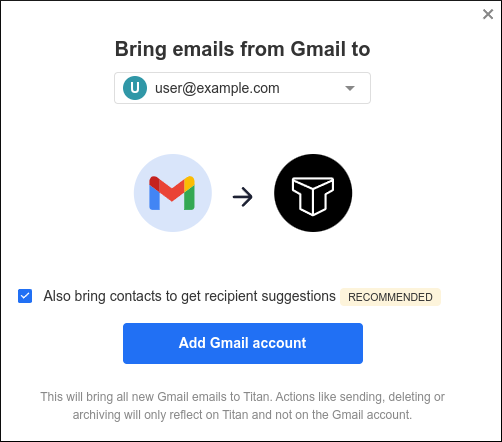 If you also want to import your Gmail contacts, select the Also bring contacts to get recipient suggestions check box.
 If you do not receive the code at your Gmail account, click Resend.