To change the active PHP version, follow these steps:
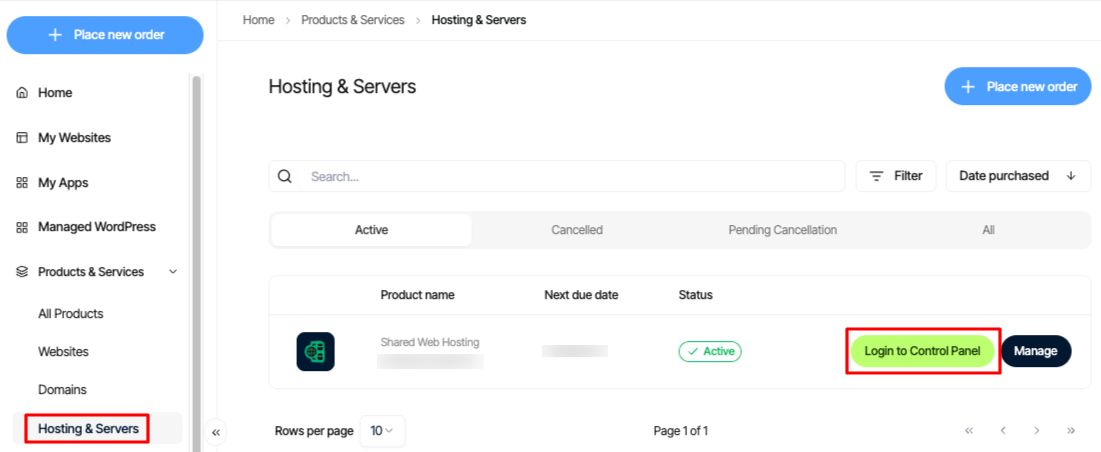
Log in to your Enhance control panel, go to Products & Services > Hosting & Servers, locate your Enhance Shared Hosting account, then click Login to Control Panel.
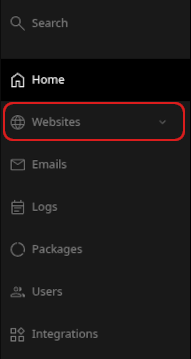
In the left sidebar, click Websites:
On the Manage websites page, click the website you want to manage.
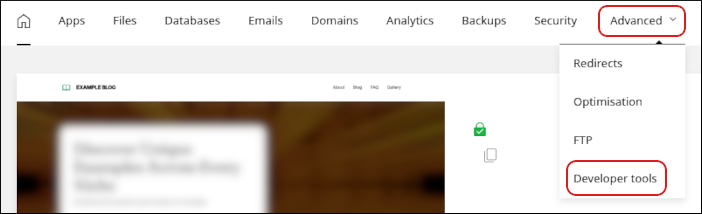
A list of tabs appears at the top of the page. Click the Advanced tab, and then click Developer tools:
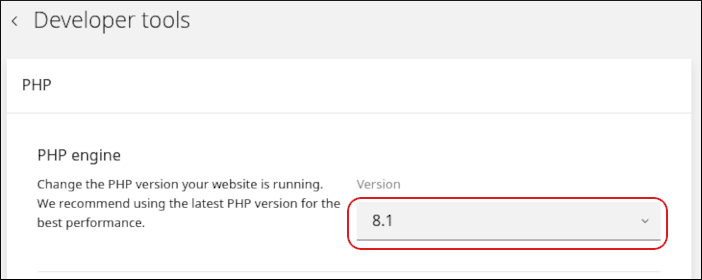
In the PHP section, in the Version list box, select the PHP version you want to use for your site:
Click Update.
Make sure the new PHP version is compatible with any applications you are running. Otherwise, your website may not work correctly.
{"docsConfig":{"theme":"mint","$schema":"https://mintlify.com/docs.json","name":"Webcentral","description":"Webcentral support and self-help guides.","colors":{"primary":"#018ffd","light":"#4c9cfc","dark":"#122e4a"},"logo":{"light":"https://mintcdn.com/web-central/QKpfFDR3nHMzBirj/logo/light.svg?fit=max\u0026auto=format\u0026n=QKpfFDR3nHMzBirj\u0026q=85\u0026s=cc74808e1f9698514f0b55a32d5d24b5","dark":"https://mintcdn.com/web-central/eDyreczjgcP0xqMJ/logo/dark.svg?fit=max\u0026auto=format\u0026n=eDyreczjgcP0xqMJ\u0026q=85\u0026s=dddaddb9e3b9ff69e1a7709e6c109343"},"favicon":{"light":"https://mintcdn.com/web-central/3ROZqs-PdzmZ-kxW/images/4452_1_13213_120x120.svg?fit=max\u0026auto=format\u0026n=3ROZqs-PdzmZ-kxW\u0026q=85\u0026s=8338f5c12a72b37b4b32b9ef05bae1ca","dark":"https://mintcdn.com/web-central/3ROZqs-PdzmZ-kxW/images/4452_1_13213_120x120.svg?fit=max\u0026auto=format\u0026n=3ROZqs-PdzmZ-kxW\u0026q=85\u0026s=8338f5c12a72b37b4b32b9ef05bae1ca"},"navbar":{"links":[{"href":"https://webcentral.au/about/support","label":"Contact Us"},{"href":"https://status.webcentral.au/","label":"Service Status"}],"primary":{"type":"button","label":"My Account","href":"https://theconsole.webcentral.au/"}},"footer":{"socials":{"x":"https://twitter.com/webcentralau","facebook":"https://www.facebook.com/webcentralau","youtube":"https://www.youtube.com/channel/UCbQiG4GIey8eDVGs1ozQggQ"}},"contextual":{"options":["copy","view","chatgpt","claude","perplexity","mcp","cursor","vscode"],"display":"header"},"styling":{"latex":false},"navigation":{"pages":[]}},"deployment":{"deploymentMetadataValue":{"subdomain":"web-central","hasAudioNarration":false,"actualSubdomain":"web-central","customDomains":["support.webcentral.au"],"gitSource":{"type":"github","owner":"panaras10","repo":"webcentralknowledgebase","deployBranch":"main","contentDirectory":"","isPrivate":true,"mountPath":"","label":""},"chroma":{"collectionId":"50a904c9-7e31-4302-99a9-a34da6835ecc","liveDeploymentHistoryId":"6ab231ba75d95d11798f3ade","schemaVersion":"v3","latestBuiltDeploymentHistoryId":"6ab231ba75d95d11798f3ade"},"entitlements":{},"buildId":"6ab231ba75d95d11798f3ade","clientVersion":"0.0.4067","searchFilterCounts":[{"language":"default","tag":"Websites \u0026 Hosting","count":75},{"language":"default","tag":"Emails","count":64},{"language":"default","tag":"Managed hosting for WordPress powered by Rocket.net","count":63},{"language":"default","tag":"General Information","count":24},{"language":"default","tag":"Accounts and Billing","count":23},{"language":"default","tag":"Domains","count":23},{"language":"default","tag":"Titan Mail","count":18},{"language":"default","tag":"Plesk","count":17},{"language":"default","tag":"cPanel","count":15},{"language":"default","tag":"OX Mail","count":13}]},"assistantConfig":{"enableAskAiButton":false,"enableStarterQuestions":false,"enableContextualStarterQuestions":false,"enableAskAiSearchBar":true},"basePath":"","hasChatPermissions":false,"hasWebMcpPermissions":false,"toggles":[{"name":"kill-isr","enabled":true,"variant":{"name":"disabled","enabled":false,"feature_enabled":true},"impressionData":false},{"name":"agent-mintlify-slack","enabled":true,"variant":{"name":"disabled","enabled":false,"feature_enabled":true},"impressionData":false},{"name":"agent-integrations-settings","enabled":true,"variant":{"name":"disabled","enabled":false,"feature_enabled":true},"impressionData":false},{"name":"rbac-expansion","enabled":true,"variant":{"name":"disabled","enabled":false,"feature_enabled":true},"impressionData":false},{"name":"automations-pr-grouping","enabled":true,"variant":{"name":"disabled","enabled":false,"feature_enabled":true},"impressionData":false},{"name":"custom-prefix","enabled":true,"variant":{"name":"disabled","enabled":false,"feature_enabled":true},"impressionData":false},{"name":"analytics-v7","enabled":true,"variant":{"name":"disabled","enabled":false,"feature_enabled":true},"impressionData":false},{"name":"user-flows-analytics","enabled":true,"variant":{"name":"disabled","enabled":false,"feature_enabled":true},"impressionData":false},{"name":"no-publish-flow","enabled":true,"variant":{"name":"disabled","enabled":false,"feature_enabled":true},"impressionData":false},{"name":"workos-onboarding","enabled":true,"variant":{"name":"disabled","enabled":false,"feature_enabled":true},"impressionData":false},{"name":"llms-txt-v2","enabled":true,"variant":{"name":"disabled","enabled":false,"feature_enabled":true},"impressionData":false},{"name":"snapshot-serving-live","enabled":true,"variant":{"name":"disabled","enabled":false,"feature_enabled":true},"impressionData":false},{"name":"stripTemperatureMiddleware","enabled":true,"variant":{"name":"disabled","enabled":false,"feature_enabled":true},"impressionData":false},{"name":"support-platform-pylon-zendesk","enabled":true,"variant":{"name":"disabled","enabled":false,"feature_enabled":true},"impressionData":false},{"name":"snapshot-serving","enabled":true,"variant":{"name":"disabled","enabled":false,"feature_enabled":true},"impressionData":false},{"name":"instant-rollback","enabled":true,"variant":{"name":"disabled","enabled":false,"feature_enabled":true},"impressionData":false},{"name":"granular-notifications-server","enabled":true,"variant":{"name":"disabled","enabled":false,"feature_enabled":true},"impressionData":false},{"name":"granular-notifications","enabled":true,"variant":{"name":"disabled","enabled":false,"feature_enabled":true},"impressionData":false},{"name":"automations-fable","enabled":true,"variant":{"name":"disabled","enabled":false,"feature_enabled":true},"impressionData":false},{"name":"fixed-ai-action-pricing","enabled":true,"variant":{"name":"disabled","enabled":false,"feature_enabled":true},"impressionData":false},{"name":"automation-resolve-merge-conflict","enabled":true,"variant":{"name":"disabled","enabled":false,"feature_enabled":true},"impressionData":false},{"name":"scoped-publishing","enabled":true,"variant":{"name":"disabled","enabled":false,"feature_enabled":true},"impressionData":false},{"name":"mintql","enabled":true,"variant":{"name":"disabled","enabled":false,"feature_enabled":true},"impressionData":false},{"name":"page-level-analytics","enabled":true,"variant":{"name":"disabled","enabled":false,"feature_enabled":true},"impressionData":false},{"name":"editor-version-history-v2","enabled":true,"variant":{"name":"disabled","enabled":false,"feature_enabled":true},"impressionData":false},{"name":"billing-page-v2","enabled":true,"variant":{"name":"disabled","enabled":false,"feature_enabled":true},"impressionData":false},{"name":"full-page-search","enabled":true,"variant":{"name":"disabled","enabled":false,"feature_enabled":true},"impressionData":false},{"name":"workspace-projects","enabled":true,"variant":{"name":"disabled","enabled":false,"feature_enabled":true},"impressionData":false},{"name":"assistant-v5","enabled":true,"variant":{"name":"disabled","enabled":false,"feature_enabled":true},"impressionData":false},{"name":"fork-pr-previews","enabled":true,"variant":{"name":"disabled","enabled":false,"feature_enabled":true},"impressionData":false},{"name":"revalidation-jwt","enabled":true,"variant":{"name":"disabled","enabled":false,"feature_enabled":true},"impressionData":false},{"name":"vite-origin","enabled":true,"variant":{"name":"disabled","enabled":false,"feature_enabled":true},"impressionData":false},{"name":"workos-sso-scim","enabled":true,"variant":{"name":"disabled","enabled":false,"feature_enabled":true},"impressionData":false},{"name":"hobby-abuse-scan","enabled":true,"variant":{"name":"disabled","enabled":false,"feature_enabled":true},"impressionData":false},{"name":"dashboard-inbox","enabled":true,"variant":{"name":"disabled","enabled":false,"feature_enabled":true},"impressionData":false},{"name":"workos-signup","enabled":true,"variant":{"name":"disabled","enabled":false,"feature_enabled":true},"impressionData":false},{"name":"turbopuffer-dual-write","enabled":true,"variant":{"name":"disabled","enabled":false,"feature_enabled":true},"impressionData":false},{"name":"workos-enabled","enabled":true,"variant":{"name":"disabled","enabled":false,"feature_enabled":true},"impressionData":false},{"name":"approve-review-flow","enabled":true,"variant":{"name":"disabled","enabled":false,"feature_enabled":true},"impressionData":false},{"name":"sso-setup-deadline-banner","enabled":true,"variant":{"name":"disabled","enabled":false,"feature_enabled":true},"impressionData":false},{"name":"turbopuffer-serve","enabled":true,"variant":{"name":"disabled","enabled":false,"feature_enabled":true},"impressionData":false}],"googleFontsInlined":false},"customCss":[],"page":{"pagePath":"enhance-control-panel/changing-php-versions-and-settings-in-enhance","slug":"/enhance-control-panel/changing-php-versions-and-settings-in-enhance","pageMetadata":{"title":"Changing PHP versions and settings in Enhance","description":"Learn how to change the PHP version and settings from one convenient interface in Enhance Control Panel.","href":"/enhance-control-panel/changing-php-versions-and-settings-in-enhance"},"description":{"compiledSource":"\"use strict\";\nconst {jsx: _jsx} = arguments[0];\nconst {useMDXComponents: _provideComponents} = arguments[0];\nfunction _createMdxContent(props) {\n const _components = {\n p: \"p\",\n ..._provideComponents(),\n ...props.components\n };\n return _jsx(_components.p, {\n children: \"Learn how to change the PHP version and settings from one convenient interface in Enhance Control Panel.\"\n });\n}\nfunction MDXContent(props = {}) {\n const {wrapper: MDXLayout} = {\n ..._provideComponents(),\n ...props.components\n };\n return MDXLayout ? _jsx(MDXLayout, {\n ...props,\n children: _jsx(_createMdxContent, {\n ...props\n })\n }) : _createMdxContent(props);\n}\nreturn {\n default: MDXContent\n};\n","frontmatter":{},"scope":{}},"pageType":"default","mdx":{"mdxSource":{"compiledSource":"\"use strict\";const{Fragment:_Fragment,jsx:_jsx,jsxs:_jsxs}=arguments[0];const{useMDXComponents:_provideComponents}=arguments[0];function _createMdxContent(props){const _components={a:`a`,em:`em`,img:`img`,li:`li`,ol:`ol`,p:`p`,strong:`strong`,ul:`ul`,..._provideComponents(),...props.components},{Heading,Warning}=_components;if(!Heading)_missingMdxReference(`Heading`,true);if(!Warning)_missingMdxReference(`Warning`,true);return _jsxs(_Fragment,{children:[_jsx(Heading,{level:`2`,id:`changing-the-php-version`,children:`Changing the PHP version`}),`\n`,_jsx(_components.p,{children:`To change the active PHP version, follow these steps:`}),`\n`,_jsxs(_components.ol,{children:[`\n`,_jsxs(_components.li,{children:[`Log in to your Enhance control panel, go to `,_jsx(_components.strong,{children:`Products \u0026 Services`}),` > `,_jsx(_components.strong,{children:`Hosting \u0026 Servers,`}),` locate your Enhance Shared Hosting account, then click `,_jsx(_components.strong,{children:`Login to Control Panel.`}),`\n`,_jsx(_components.img,{src:`https://files.readme.io/0aaf0068d32f8410dbb63b63beac82a7f31eafb6c34f898ac02ad96f5d199108-image.png`,alt:``})]}),`\n`,_jsxs(_components.li,{children:[`In the left sidebar, click `,_jsx(_components.strong,{children:`Websites`}),`:`]}),`\n`]}),`\n`,_jsx(_components.p,{children:_jsx(_components.img,{src:`https://files.readme.io/228bef28a564fa447f4a92d5c208a9c69d68e7e5322737068090c99d2d6b34a5-image.png`,alt:``})}),`\n`,_jsxs(_components.ol,{start:`3`,children:[`\n`,_jsxs(_components.li,{children:[`On the `,_jsx(_components.strong,{children:`Manage websites`}),` page, click the website you want to manage.`]}),`\n`,_jsxs(_components.li,{children:[`A list of tabs appears at the top of the page. Click the `,_jsx(_components.strong,{children:`Advanced`}),` tab, and then click `,_jsx(_components.strong,{children:`Developer tools`}),`:\n`,_jsx(_components.img,{src:`https://files.readme.io/d61773971b252670d1aaa77aa52298563ca5c27202e6d7931b2966ff4221ddc4-image.png`,alt:``})]}),`\n`,_jsxs(_components.li,{children:[`In the `,_jsx(_components.strong,{children:`PHP`}),` section, in the `,_jsx(_components.strong,{children:`Version`}),` list box, select the PHP version you want to use for your site:\n`,_jsx(_components.img,{src:`https://files.readme.io/721957ecfacf6e8a7b7751cb0277bd85c40e72aef2c349b82ef9e703bc5571b0-image.png`,alt:``})]}),`\n`,_jsxs(_components.li,{children:[`Click `,_jsx(_components.strong,{children:`Update`}),`.`]}),`\n`]}),`\n`,_jsx(Warning,{children:_jsx(_components.p,{children:`Make sure the new PHP version is compatible with any applications you are running. Otherwise, your website may not work correctly.`})}),`\n`,_jsx(Heading,{level:`2`,id:`changing-php-settings`,children:`Changing PHP settings`}),`\n`,_jsx(_components.p,{children:`You can change php.ini directives to customize your PHP environment. To do this, follow these steps:`}),`\n`,_jsxs(_components.ol,{children:[`\n`,_jsx(_components.li,{children:`Log in to your Enhance control panel.`}),`\n`,_jsxs(_components.li,{children:[`In the left sidebar, click `,_jsx(_components.strong,{children:`Websites`}),`:`]}),`\n`]}),`\n`,_jsx(_components.p,{children:_jsx(_components.img,{src:`https://files.readme.io/228bef28a564fa447f4a92d5c208a9c69d68e7e5322737068090c99d2d6b34a5-image.png`,alt:``})}),`\n`,_jsxs(_components.ol,{start:`3`,children:[`\n`,_jsxs(_components.li,{children:[`On the `,_jsx(_components.strong,{children:`Manage websites`}),` page, click the website you want to manage.`]}),`\n`,_jsxs(_components.li,{children:[`A list of tabs appears at the top of the page. Click the `,_jsx(_components.strong,{children:`Advanced`}),` tab, and then click `,_jsx(_components.strong,{children:`Developer tools`}),`:\n`,_jsx(_components.img,{src:`https://files.readme.io/d61773971b252670d1aaa77aa52298563ca5c27202e6d7931b2966ff4221ddc4-image.png`,alt:``})]}),`\n`,_jsxs(_components.li,{children:[`In the sidebar, click `,_jsx(_components.strong,{children:`php.ini editor`}),`:\n`,_jsx(_components.img,{src:`https://files.readme.io/28fb454fd6bcaac13a57ac760b5571730440007774b0034e766e460303fd1bd1-image.png`,alt:``})]}),`\n`,_jsxs(_components.li,{children:[`In the `,_jsx(_components.strong,{children:`php.ini editor`}),` section, click `,_jsx(_components.strong,{children:`Add directive`}),`:\n`,_jsx(_components.img,{src:`https://files.readme.io/d28f6c906ef7cfe79ea31f5787ede34d780db28ab1b61c15554971f3be65abdb-image.png`,alt:``})]}),`\n`,_jsxs(_components.li,{children:[`In the `,_jsx(_components.strong,{children:`Directive`}),` text box, type the name of the directive you want to configure:\n`,_jsx(_components.img,{src:`https://files.readme.io/762081030e8aa643eb36012800a412e8399a75ddd0f6eb9241ed39bb975c7571-image.png`,alt:``})]}),`\n`,_jsxs(_components.li,{children:[`In the `,_jsx(_components.strong,{children:`Value`}),` list box, select `,_jsx(_components.strong,{children:`Text`}),` or `,_jsx(_components.strong,{children:`Boolean`}),`:`,`\n`,_jsxs(_components.ol,{children:[`\n`,_jsxs(_components.li,{children:[`For a text value, type the value in the `,_jsx(_components.strong,{children:`Text`}),` text box.`]}),`\n`,_jsxs(_components.li,{children:[`For a boolean value, click `,_jsx(_components.strong,{children:`Enable`}),` or `,_jsx(_components.strong,{children:`Disable`}),`.`]}),`\n`]}),`\n`]}),`\n`,_jsxs(_components.li,{children:[`Click `,_jsx(_components.strong,{children:`Create`}),`. The directive appears in the list of configured directives.`]}),`\n`,_jsxs(_components.li,{children:[`To make the new `,_jsx(_components.em,{children:`php.ini`}),` settings take effect, follow these steps:`,`\n`,_jsxs(_components.ul,{children:[`\n`,_jsxs(_components.li,{children:[`In the left sidebar, click `,_jsx(_components.strong,{children:`PHP`}),`.`]}),`\n`,_jsxs(_components.li,{children:[`In the `,_jsx(_components.strong,{children:`Restart PHP container`}),` section, click `,_jsx(_components.strong,{children:`Restart`}),`.`]}),`\n`]}),`\n`]}),`\n`]}),`\n`,_jsx(Heading,{level:`2`,id:`related-articles`,children:`Related articles`}),`\n`,_jsxs(_components.ul,{children:[`\n`,_jsx(_components.li,{children:_jsx(_components.a,{href:`/enhance-control-panel/managing-your-wordpress-site-in-enhance`,children:`Managing your WordPress site in Enhance`})}),`\n`,_jsx(_components.li,{children:_jsx(_components.a,{href:`/enhance-control-panel/installing-an-ssl-certificate-in-enhance`,children:`Installing an SSL certificate in Enhance`})}),`\n`,_jsx(_components.li,{children:_jsx(_components.a,{href:`/enhance-control-panel/managing-your-domains-in-enhance`,children:`Managing your Domains in Enhance`})}),`\n`,_jsx(_components.li,{children:_jsx(_components.a,{href:`/enhance-control-panel/managing-your-email-in-enhance`,children:`Managing your Email in Enhance`})}),`\n`,_jsx(_components.li,{children:_jsx(_components.a,{href:`/enhance-control-panel/using-the-file-manager-in-enhance`,children:`Using the File Manager in Enhance`})}),`\n`,_jsx(_components.li,{children:_jsx(_components.a,{href:`/enhance-control-panel/managing-backups-in-enhance`,children:`Managing Backups in Enhance`})}),`\n`,_jsx(_components.li,{children:_jsx(_components.a,{href:`/enhance-control-panel/managing-your-mysql-databases-in-enhance`,children:`Managing your MySQL databases in Enhance`})}),`\n`,_jsx(_components.li,{children:_jsx(_components.a,{href:`/enhance-control-panel/managing-ftp-accounts-in-enhance`,children:`Managing FTP accounts in Enhance`})}),`\n`,_jsx(_components.li,{children:_jsx(_components.a,{href:`/enhance-control-panel/configuring-ssh-access-in-enhance`,children:`Configuring SSH access in Enhance`})}),`\n`]})]})}function MDXContent(props={}){const{wrapper:MDXLayout}={..._provideComponents(),...props.components};return MDXLayout?_jsx(MDXLayout,{...props,children:_jsx(_createMdxContent,{...props})}):_createMdxContent(props)}return{default:MDXContent};function _missingMdxReference(id,component){throw new Error(`Expected `+(component?`component`:`object`)+\" `\"+id+\"` to be defined: you likely forgot to import, pass, or provide it.\")}","frontmatter":{},"scope":{"config":{},"pageMetadata":{"title":"Changing PHP versions and settings in Enhance","description":"Learn how to change the PHP version and settings from one convenient interface in Enhance Control Panel.","href":"/enhance-control-panel/changing-php-versions-and-settings-in-enhance"}}},"mdxSourceWithNoJs":null},"mdxExtracts":{"tableOfContents":[{"title":"Changing the PHP version","slug":"changing-the-php-version","depth":2,"children":[]},{"title":"Changing PHP settings","slug":"changing-php-settings","depth":2,"children":[]},{"title":"Related articles","slug":"related-articles","depth":2,"children":[]}],"codeExamples":{}},"jsLinks":[],"subdomain":"web-central","siteName":"Webcentral","title":"Changing PHP versions and settings in Enhance - Webcentral","navMaps":{"firstHrefInVersion":{},"firstHrefInLanguage":{}},"lastModified":"2026-06-29T16:01:24.261Z","originalFileLocation":"enhance-control-panel/changing-php-versions-and-settings-in-enhance.mdx"},"headHtml":"\u003cscript data-mint-head>(function(){var d=document.documentElement,p=null;if(!p){try{p=localStorage.getItem(\"isDarkMode\")}catch(e){}if(p==='true')p='dark';else if(p==='false')p='light';if(p!=='light'\u0026\u0026p!=='dark'\u0026\u0026p!=='system')p=\"system\"}var r=p==='system'?(matchMedia(\"(prefers-color-scheme: dark)\").matches?'dark':'light'):p;d.classList.remove(r==='dark'?'light':'dark');d.classList.add(r);d.setAttribute(\"data-theme-preference\",p)})();\u003c/script>\u003cmeta data-mint-head name=\"description\" content=\"Learn how to change the PHP version and settings from one convenient interface in Enhance Control Panel.\">\u003cmeta data-mint-head name=\"application-name\" content=\"Webcentral\">\u003cmeta data-mint-head name=\"generator\" content=\"Mintlify\">\u003clink data-mint-head rel=\"icon\" type=\"image/png\" sizes=\"192x192\" href=\"/mintlify-assets/_mintlify/favicons/web-central/Tmk-N0Louhsmq8ot/_generated/favicon/android-chrome-192x192.png\" media=\"(prefers-color-scheme: light)\">\u003clink data-mint-head rel=\"apple-touch-icon\" type=\"image/png\" sizes=\"180x180\" href=\"/mintlify-assets/_mintlify/favicons/web-central/Tmk-N0Louhsmq8ot/_generated/favicon/apple-touch-icon.png\">\u003clink data-mint-head rel=\"icon\" type=\"image/png\" sizes=\"16x16\" href=\"/mintlify-assets/_mintlify/favicons/web-central/Tmk-N0Louhsmq8ot/_generated/favicon/favicon-16x16.png\" media=\"(prefers-color-scheme: light)\">\u003clink data-mint-head rel=\"icon\" type=\"image/png\" sizes=\"32x32\" href=\"/mintlify-assets/_mintlify/favicons/web-central/Tmk-N0Louhsmq8ot/_generated/favicon/favicon-32x32.png\" media=\"(prefers-color-scheme: light)\">\u003clink data-mint-head rel=\"shortcut icon\" type=\"image/x-icon\" href=\"/mintlify-assets/_mintlify/favicons/web-central/Tmk-N0Louhsmq8ot/_generated/favicon/favicon.ico\" media=\"(prefers-color-scheme: light)\">\u003clink data-mint-head rel=\"icon\" type=\"image/png\" sizes=\"192x192\" href=\"/mintlify-assets/_mintlify/favicons/web-central/Tmk-N0Louhsmq8ot/_generated/favicon-dark/android-chrome-192x192.png\" media=\"(prefers-color-scheme: dark)\">\u003clink data-mint-head rel=\"icon\" type=\"image/png\" sizes=\"16x16\" href=\"/mintlify-assets/_mintlify/favicons/web-central/Tmk-N0Louhsmq8ot/_generated/favicon-dark/favicon-16x16.png\" media=\"(prefers-color-scheme: dark)\">\u003clink data-mint-head rel=\"icon\" type=\"image/png\" sizes=\"32x32\" href=\"/mintlify-assets/_mintlify/favicons/web-central/Tmk-N0Louhsmq8ot/_generated/favicon-dark/favicon-32x32.png\" media=\"(prefers-color-scheme: dark)\">\u003clink data-mint-head rel=\"shortcut icon\" type=\"image/x-icon\" href=\"/mintlify-assets/_mintlify/favicons/web-central/Tmk-N0Louhsmq8ot/_generated/favicon-dark/favicon.ico\" media=\"(prefers-color-scheme: dark)\">\u003cmeta data-mint-head property=\"og:title\" content=\"Changing PHP versions and settings in Enhance - Webcentral\">\u003cmeta data-mint-head property=\"og:description\" content=\"Learn how to change the PHP version and settings from one convenient interface in Enhance Control Panel.\">\u003cmeta data-mint-head property=\"og:site_name\" content=\"Webcentral\">\u003cmeta data-mint-head property=\"og:url\" content=\"https://support.webcentral.au/enhance-control-panel/changing-php-versions-and-settings-in-enhance\">\u003cmeta data-mint-head property=\"og:type\" content=\"website\">\u003cmeta data-mint-head property=\"og:image\" content=\"https://web-central.mintlify.app/_mintlify/api/og/v2?division=Enhance+Control+Panel\u0026amp;title=Changing+PHP+versions+and+settings+in+Enhance\u0026amp;description=Learn+how+to+change+the+PHP+version+and+settings+from+one+convenient+interface+in+Enhance+Control+Panel.\u0026amp;theme=fca177c18ef2ae9eb6f3455e\u0026amp;signature=dd87a23d0d54c0494344919af687177711fc5220498df6af3711762d068b2d78\">\u003cmeta data-mint-head property=\"og:image:width\" content=\"1200\">\u003cmeta data-mint-head property=\"og:image:height\" content=\"630\">\u003cmeta data-mint-head name=\"twitter:card\" content=\"summary_large_image\">\u003cmeta data-mint-head name=\"twitter:title\" content=\"Changing PHP versions and settings in Enhance - Webcentral\">\u003cmeta data-mint-head name=\"twitter:description\" content=\"Learn how to change the PHP version and settings from one convenient interface in Enhance Control Panel.\">\u003cmeta data-mint-head name=\"twitter:image\" content=\"https://web-central.mintlify.app/_mintlify/api/og/v2?division=Enhance+Control+Panel\u0026amp;title=Changing+PHP+versions+and+settings+in+Enhance\u0026amp;description=Learn+how+to+change+the+PHP+version+and+settings+from+one+convenient+interface+in+Enhance+Control+Panel.\u0026amp;theme=fca177c18ef2ae9eb6f3455e\u0026amp;signature=dd87a23d0d54c0494344919af687177711fc5220498df6af3711762d068b2d78\">\u003cmeta data-mint-head name=\"twitter:image:width\" content=\"1200\">\u003cmeta data-mint-head name=\"twitter:image:height\" content=\"630\">\u003cmeta data-mint-head name=\"msapplication-config\" content=\"/mintlify-assets/_mintlify/favicons/web-central/Tmk-N0Louhsmq8ot/_generated/favicon/browserconfig.xml\">\u003cmeta data-mint-head name=\"apple-mobile-web-app-title\" content=\"Webcentral\">\u003cmeta data-mint-head name=\"msapplication-TileColor\" content=\"#018ffd\">\u003clink data-mint-head rel=\"canonical\" href=\"https://support.webcentral.au/enhance-control-panel/changing-php-versions-and-settings-in-enhance\">\u003clink data-mint-head rel=\"alternate\" type=\"application/xml\" href=\"/sitemap.xml\">\u003clink data-mint-head rel=\"alternate\" type=\"text/markdown\" href=\"/enhance-control-panel/changing-php-versions-and-settings-in-enhance.md\">\u003cscript data-mint-head type=\"application/ld+json\">{\"@context\":\"https://schema.org\",\"@graph\":[{\"@type\":\"Organization\",\"@id\":\"https://support.webcentral.au/#organization\",\"name\":\"Webcentral\",\"url\":\"https://support.webcentral.au\",\"logo\":{\"@type\":\"ImageObject\",\"url\":\"https://mintcdn.com/web-central/QKpfFDR3nHMzBirj/logo/light.svg?fit=max\u0026auto=format\u0026n=QKpfFDR3nHMzBirj\u0026q=85\u0026s=cc74808e1f9698514f0b55a32d5d24b5\"}},{\"@type\":\"WebSite\",\"@id\":\"https://support.webcentral.au#website\",\"name\":\"Webcentral\",\"url\":\"https://support.webcentral.au\",\"publisher\":{\"@id\":\"https://support.webcentral.au/#organization\"}},{\"@type\":\"WebPage\",\"@id\":\"https://support.webcentral.au/enhance-control-panel/changing-php-versions-and-settings-in-enhance#webpage\",\"url\":\"https://support.webcentral.au/enhance-control-panel/changing-php-versions-and-settings-in-enhance\",\"name\":\"Changing PHP versions and settings in Enhance\",\"description\":\"Learn how to change the PHP version and settings from one convenient interface in Enhance Control Panel.\",\"dateModified\":\"2026-06-29T16:01:24.261Z\",\"isPartOf\":{\"@id\":\"https://support.webcentral.au#website\"},\"breadcrumb\":{\"@id\":\"https://support.webcentral.au/enhance-control-panel/changing-php-versions-and-settings-in-enhance#breadcrumb\"}},{\"@type\":\"BreadcrumbList\",\"@id\":\"https://support.webcentral.au/enhance-control-panel/changing-php-versions-and-settings-in-enhance#breadcrumb\",\"itemListElement\":[{\"@type\":\"ListItem\",\"position\":1,\"name\":\"Enhance Control Panel\",\"item\":\"https://support.webcentral.au/enhance-control-panel/managing-your-website-databases-and-backups-in-enhance\"},{\"@type\":\"ListItem\",\"position\":2,\"name\":\"Changing PHP versions and settings in Enhance\",\"item\":\"https://support.webcentral.au/enhance-control-panel/changing-php-versions-and-settings-in-enhance\"}]},{\"@type\":[\"Article\",\"TechArticle\"],\"@id\":\"https://support.webcentral.au/enhance-control-panel/changing-php-versions-and-settings-in-enhance#article\",\"headline\":\"Changing PHP versions and settings in Enhance\",\"name\":\"Changing PHP versions and settings in Enhance\",\"description\":\"Learn how to change the PHP version and settings from one convenient interface in Enhance Control Panel.\",\"url\":\"https://support.webcentral.au/enhance-control-panel/changing-php-versions-and-settings-in-enhance\",\"mainEntityOfPage\":{\"@id\":\"https://support.webcentral.au/enhance-control-panel/changing-php-versions-and-settings-in-enhance#webpage\"},\"dateModified\":\"2026-06-29T16:01:24.261Z\",\"publisher\":{\"@id\":\"https://support.webcentral.au/#organization\"},\"isPartOf\":{\"@id\":\"https://support.webcentral.au#website\"}}]}\u003c/script>\u003cscript data-mint-head type=\"application/ld+json\">{\"@context\":\"https://schema.org\",\"@type\":\"WebSite\",\"name\":\"Webcentral\",\"creator\":{\"@type\":\"Organization\",\"name\":\"Mintlify\",\"url\":\"https://mintlify.com\"}}\u003c/script>","siteName":"Webcentral","nav":{"global":null,"pages":[{"title":"Explore Our Self-Help Guides","href":"/index"},{"group":"Accounts and Billing","icon":"credit-card","pages":[{"title":"Welcome to Webcentral","href":"/docs/welcome-to-webcentral"},{"title":"Making the Switch to Webcentral","href":"/accounts-and-billing/making-the-switch-to-webcentral"},{"title":"Affiliate Program","href":"/accounts-and-billing/affiliate-program"},{"title":"Service-Level Access Delegation","href":"/accounts-and-billing/service-level-access-delegation"},{"title":"Password security","href":"/accounts-and-billing/password-security"},{"title":"Webcentral billing FAQ","href":"/accounts-and-billing/webcentral-billing-faq"},{"title":"How to Add Credit Cards and other Payment Methods","href":"/accounts-and-billing/how-to-add-credit-cards-manage-payment-methods"},{"title":"Managing billing in the Hosting Panel","href":"/accounts-and-billing/managing-billing-in-the-hosting-panel"},{"title":"Accessing the Hosting Panel","href":"/accounts-and-billing/accessing-the-hosting-panel"},{"title":"Managing your profile in the Hosting Panel","href":"/accounts-and-billing/managing-your-profile-in-the-hosting-panel"},{"title":"Viewing your Support PIN","href":"/accounts-and-billing/viewing-your-support-pin"},{"title":"Working with tickets in the Hosting Panel","href":"/accounts-and-billing/working-with-tickets"},{"title":"Updating the default email address for your account","href":"/accounts-and-billing/updating-the-default-email-address-for-your-account"},{"title":"Viewing and changing settings for cPanel hosting accounts","href":"/accounts-and-billing/viewing-and-changing-settings-for-shared-hosting-accounts"},{"title":"Domain management in the Hosting Panel","href":"/accounts-and-billing/domain-management-in-the-hosting-panel"},{"title":"Cancelling a product or service on the Hosting Panel","href":"/accounts-and-billing/cancelling-a-product-or-service-on-the-hosting-panel"},{"title":"Upgrading or downgrading your hosting plan","href":"/accounts-and-billing/upgrading-or-downgrading-your-hosting-plan"},{"title":"Accessing your email account","href":"/accounts-and-billing/accessing-your-email-account"},{"title":"Managing DNS settings in the Hosting Panel","href":"/accounts-and-billing/managing-dns-settings-in-the-hosting-panel"},{"title":"Recovering account access","href":"/accounts-and-billing/recovering-account-access"},{"title":"Known Scams","href":"/accounts-and-billing/known-scams-1"},{"title":"Renewing a domain purchased from Webcentral","href":"/accounts-and-billing/renewing-a-domain"},{"title":"Requesting site migration from another host to Webcentral","href":"/accounts-and-billing/site-migration-request"}]},{"group":"Domains","icon":"globe","pages":[{"title":"Moving Your Domains to Webcentral","href":"/domains/moving-your-domains-to-webcentral"},{"group":".au Domains and ccTLDs","pages":[{"title":"What is AuDA?","href":"/domains/au-domains-and-cctlds/what-is-auda"},{"title":".au Domain Lifecycle","href":"/domains/au-domains-and-cctlds/au-domain-lifecycle"},{"title":"Changing ownership of .au domain names/Change of Registrant (COR)","href":"/domains/au-domains-and-cctlds/changing-ownership-of-au-domain-names"},{"title":"Registrant VS Registrant Contact","href":"/domains/au-domains-and-cctlds/registrant-vs-registrant-contact"},{"title":"Changes to .org.au Domain Names","href":"/domains/au-domains-and-cctlds/changes-to-orgau-domain-names"},{"title":"com.au and net.au eligibility rule changes","href":"/domains/au-domains-and-cctlds/comau-and-netau-eligibility-rule-changes"}]},{"group":".com Domains and gTLDs","pages":[{"title":"gTLD domain expiration cycle","href":"/domains/com-domains-and-gtlds/gtld-domain-expiration-cycle"},{"title":"What is ICANN?","href":"/domains/com-domains-and-gtlds/what-is-icann"},{"title":"WHOIS contact data reminder emails","href":"/domains/com-domains-and-gtlds/whois-contact-data-reminder-emails"}]},{"group":"General Information","pages":[{"title":"What are my name servers?","href":"/domains/general-information-2/what-are-my-name-servers"},{"title":"Domain Privacy","href":"/domains/general-information-2/domain-privacy"},{"title":"Renew a Domain, Auto Renewal and Domain Deletion","href":"/domains/general-information-2/how-to-renew-a-domain"},{"title":"Domain Password/EPP Code/UDAI","href":"/domains/general-information-2/domain-password-epp-code-auth-code"},{"title":"I’ve registered the wrong domain! What do I do?","href":"/domains/general-information-2/ive-registered-the-wrong-domain-what-do-i-do"},{"title":"Transferring domains away from Webcentral","href":"/domains/general-information-2/transferring-domains-away-from-webcentral"},{"title":"How can I dispute a domain registration?","href":"/domains/general-information-2/how-can-i-dispute-a-domain-registration"},{"title":"Why isn’t my domain name working?","href":"/domains/general-information-2/why-isnt-my-domain-name-working"},{"title":"Understanding Domain Privacy Protection \u0026 Alternatives for .AU Domains","href":"/domains/general-information-2/understanding-domain-privacy-protection-alternatives-for-au-domains"},{"title":"How to Update Registrant Contact Information","href":"/domains/general-information-2/how-to-update-registrant-contact-information"},{"title":"I Just Received an Email Asking for my ABN?","href":"/domains/general-information-2/i-just-received-an-email-asking-for-my-abn"},{"title":"ICANN Registration Data Policy changes","href":"/domains/general-information-2/icann-registration-data-policy-changes"},{"title":"Accessing your web site before DNS propagation is complete","href":"/domains/accessing-your-website-before-DNS-propagation"}]}]},{"group":"Emails","icon":"envelope","pages":[{"group":"General Information","pages":[{"title":"Switching your Email Service to Webcentral","href":"/emails/general-information-1/switching-your-email-service-to-webcentral"},{"title":"Why isn’t my email working?","href":"/emails/general-information-1/why-isnt-my-email-working"},{"title":"My email has been blacklisted","href":"/emails/general-information-1/my-e-mail-has-been-blacklisted"},{"title":"My email address appears to be sending spam! What do I do?","href":"/emails/general-information-1/my-email-address-appears-to-be-sending-spam-what-do-i-do"},{"title":"Anti-spam solutions","href":"/emails/general-information-1/anti-spam-solutions"},{"title":"Email sending restrictions","href":"/emails/general-information-1/email-sending-restrictions"}]},{"group":"Device Setup","pages":[{"title":"Email Setup Tutorials","href":"/emails/device-setup/email-setup-tutorials"},{"title":"Email Software Settings","href":"/emails/device-setup/email-software-settings"},{"title":"POP vs IMAP","href":"/emails/device-setup/pop-vs-imap"},{"title":"Outlook Setup on iOS or iPadOS","href":"/emails/device-setup/outlook-on-ios-or-ipados-setup"},{"title":"Outlook (New/2024) Setup on Windows","href":"/emails/device-setup/outlook-new2024-setup"},{"title":"iOS 17 or iPadOS Mail App Setup","href":"/emails/device-setup/ios-17-mail-app-setup"},{"title":"macOS Sonoma Mail.app Setup","href":"/emails/device-setup/macos-sonoma-mailapp-setup"}]},{"group":"Professional \u0026 Business Mail","pages":[{"title":"Professional \u0026 Business Email Setup","href":"/emails/professional-mail/professional-business-email-setup"},{"title":"Using the Mail Migration Tool","href":"/emails/professional-mail/using-the-professional-mail-migration-tool"},{"title":"How to Reset the Password","href":"/emails/professional-mail/how-to-reset-the-password"},{"title":"Enable Catch All Emails on Business \u0026 Professional Packages","href":"/emails/professional-mail/enable-catch-all-emails-on-business-professional-packages"},{"title":"Message sending limits for Professional and Business Email","href":"/emails/professional-mail/sending-limits-for-professional-and-business-email"}]},{"group":"MS365 Emails","pages":[{"title":"Creating a New Email Account in Microsoft 365 and Managing Users","href":"/emails/ms365-emails/creating-a-new-email-account-in-microsoft-365-and-re-assigning-a-license"},{"title":"Changing your password in Microsoft 365","href":"/emails/ms365-emails/changing-your-password-in-microsoft-365"},{"title":"How to add a Microsoft email account to Outlook","href":"/emails/ms365-emails/how-to-add-a-microsoft-email-account-to-outlook"},{"title":"Microsoft 365 Zone Records","href":"/emails/ms365-emails/microsoft-365-zone-records"},{"title":"Setup Automatic Replies in Outlook (New) or Microsoft Email","href":"/emails/ms365-emails/how-to-set-up-automatic-replies-for-your-microsoft-email-account"},{"title":"How to connect your domain with Microsoft","href":"/emails/ms365-emails/how-to-connect-your-domain-with-microsoft"},{"title":"Backup emails using Microsoft Outlook","href":"/emails/ms365-emails/backup-emails-using-microsoft-outlook"}]},{"group":"cPanel Emails","pages":[{"title":"Create a catch-all email address","href":"/emails/cpanel-emails/create-a-catch-all-email-address"},{"title":"Create an email forwarding address","href":"/emails/cpanel-emails/create-an-email-forwarding-address"},{"title":"How to create a new email account in cPanel","href":"/emails/cpanel-emails/how-to-create-a-professional-email-in-cpanel"},{"title":"Email Forwarders (Alias) in cPanel","href":"/emails/cpanel-emails/how-to-create-an-alias-forwarder-in-cpanel"},{"title":"Delivering email to Gmail","href":"/emails/cpanel-emails/delivering-emails-to-gmail"},{"title":"Email maximum defers and failures per hour","href":"/emails/cpanel-emails/domain-has-exceeded-the-maximum-defers-and-failures-per-hour"},{"title":"My emails are going to people's spam or junk folder (cPanel)","href":"/emails/cpanel-emails/my-emails-are-going-to-peoples-spam-or-junk-folder-cpanel"},{"title":"How to Increase Email Storage in cPanel","href":"/emails/cpanel-emails/how-to-increase-email-storage-in-cpanel"}]},{"group":"OX Mail","pages":[{"title":"How to create an email signature in WebmailOX","href":"/emails/ox-mail-1/how-to-create-an-email-signature-in-webmailox"},{"title":"How to add 2 Step verification to OX Mail","href":"/emails/ox-mail-1/how-to-add-2-step-verification-to-professional-email"},{"title":"Microsoft Email to OX Mail Migration FAQ","href":"/emails/ox-mail-1/microsoft-email-to-professional-email-migration-faq"},{"title":"How to set up forwarding in OX Email","href":"/emails/ox-mail-1/how-to-set-up-forwarding-in-professional-email"},{"title":"How to link your domain to your OX Email","href":"/emails/ox-mail-1/how-to-link-your-domain-to-your-professional-email"},{"title":"OX Email server settings","href":"/emails/ox-mail-1/how-to-find-your-professional-email-server-settings"},{"title":"How to add your OX Email account to Outlook","href":"/emails/ox-mail-1/how-to-add-your-professional-email-account-to-outlook"},{"title":"How to add your OX Email to the Apple Mail app","href":"/emails/ox-mail-1/how-to-add-your-professional-email-to-apple-mail-on-a-mac"},{"title":"How to add your OX Email account to Gmail on Android","href":"/emails/ox-mail-1/how-to-add-your-professional-email-account-to-gmail-on-android"},{"title":"How to add your OX Email account to Windows Mail","href":"/emails/ox-mail-1/how-to-add-your-professional-email-account-to-windows-mail"},{"title":"How to add your OX Email account to the iPhone and iPad Mail app","href":"/emails/ox-mail-1/how-to-add-your-professional-email-account-to-the-iphone-and-ipad-mail-app"},{"title":"How to add your OX Email account to Mozilla Thunderbird","href":"/emails/ox-mail-1/how-to-add-your-professional-email-account-to-mozilla-thunderbird"},{"title":"How to log in and use OX Email (including signatures, calendars and tasks)","href":"/emails/ox-mail-1/how-to-log-in-and-use-professional-email-including-signatures-calendars-and-tasks"}]},{"group":"Titan Mail","pages":[{"title":"Setting up your domain's DNS records for Titan Mail","href":"/emails/titan-mail/setting-up-your-domains-dns-records-for-titan-mail"},{"title":"Managing Titan Mail accounts","href":"/emails/titan-mail/managing-titan-mail-accounts"},{"title":"Managing your email in Titan Mail webmail","href":"/emails/titan-mail/managing-your-email-in-titan-mail-webmail"},{"title":"Setting up Titan Mail on Android devices","href":"/emails/titan-mail/setting-up-titan-mail-on-android-devices"},{"title":"Setting up Titan Mail on Apple iOS devices","href":"/emails/titan-mail/setting-up-titan-mail-on-apple-ios-devices"},{"title":"Setting up Titan Mail on Microsoft Mail","href":"/emails/titan-mail/setting-up-titan-mail-on-microsoft-mail"},{"title":"Setting up Titan Mail on Microsoft Outlook","href":"/emails/titan-mail/setting-up-titan-mail-on-microsoft-outlook"},{"title":"Setting up Titan Mail on an email client application","href":"/emails/titan-mail/setting-up-titan-mail-on-an-email-client-application"},{"title":"Clearing the webmail cache on Titan Mail accounts","href":"/emails/titan-mail/clearing-the-webmail-cache-on-titan-mail-accounts"},{"title":"Enabling two-factor authentication for Titan Mail accounts","href":"/emails/titan-mail/enabling-two-factor-authentication-for-titan-mail-accounts"},{"title":"Importing email data into Titan Mail accounts","href":"/emails/titan-mail/importing-email-data-into-titan-mail-accounts"},{"title":"Importing contacts into Titan Mail accounts","href":"/emails/titan-mail/importing-contacts-into-titan-mail-accounts"},{"title":"Changing your password for Titan Mail accounts","href":"/emails/titan-mail/changing-your-password-for-titan-mail-accounts"},{"title":"Managing email signatures for Titan Mail accounts","href":"/emails/titan-mail/managing-email-signatures-for-titan-mail-accounts"},{"title":"Managing external email forwarders in Titan Mail","href":"/emails/titan-mail/managing-external-email-forwarders-in-titan-mail"},{"title":"Integrating Titan Mail accounts with Gmail","href":"/emails/titan-mail/integrating-titan-mail-accounts-with-gmail"},{"title":"Setting up DKIM (DomainKeys Identified Mail) for Titan Mail accounts","href":"/emails/titan-mail/setting-up-dkim-domainkeys-identified-mail-for-titan-mail-accounts"},{"title":"Ensuring high email deliverability for Titan Mail accounts","href":"/emails/titan-mail/ensuring-high-email-deliverability-for-titan-mail-accounts"}]}]},{"group":"Websites \u0026 Hosting","icon":"server","pages":[{"group":"General Information","pages":[{"title":"Moving Your Site to Webcentral","href":"/websites-hosting/general-information/moving-your-site-to-webcentral"},{"title":"How to upload files using File Manager","href":"/websites-hosting/general-information/how-to-upload-files-using-file-manager"},{"title":"Common website errors","href":"/websites-hosting/general-information/common-website-errors"},{"title":"Protecting your site against hackers","href":"/websites-hosting/general-information/protecting-your-site-against-hackers"},{"title":"How to deal with a hacked website","href":"/websites-hosting/general-information/how-to-deal-with-a-hacked-website"}]},{"group":"The Hosting Panel","pages":[{"title":"Managing your website in the Hosting Panel","href":"/websites-hosting/hosting-panel/managing-your-website-in-the-hosting-panel"},{"title":"Managing your website files in the Hosting Panel","href":"/websites-hosting/hosting-panel/managing-your-website-files-in-the-hosting-panel"},{"title":"Managing your MySQL databases in the Hosting Panel","href":"/websites-hosting/hosting-panel/managing-your-mysql-databases-in-the-hosting-panel"},{"title":"Managing your email in the Hosting Panel","href":"/websites-hosting/hosting-panel/managing-your-email-in-the-hosting-panel"},{"title":"Managing your domains in the Hosting Panel","href":"/websites-hosting/hosting-panel/managing-your-domains-in-the-hosting-panel"},{"title":"Managing backups in the Hosting Panel","href":"/websites-hosting/hosting-panel/managing-backups-in-the-hosting-panel"},{"title":"Installing an SSL certificate in the Hosting Panel","href":"/websites-hosting/hosting-panel/installing-an-ssl-certificate-in-the-hosting-panel"},{"title":"Managing FTP accounts in the Hosting Panel","href":"/websites-hosting/hosting-panel/managing-ftp-accounts-in-the-hosting-panel"},{"title":"Changing PHP versions and settings in the Hosting Panel","href":"/websites-hosting/hosting-panel/changing-php-versions-and-settings-in-the-hosting-panel"},{"title":"Configuring SSH access in the Hosting Panel","href":"/websites-hosting/hosting-panel/configuring-ssh-access-in-the-hosting-panel"},{"title":"Managing your WordPress site in the Hosting Panel","href":"/websites-hosting/hosting-panel/managing-your-wordpress-site-in-the-hosting-panel"}]},{"group":"DNS and Zone Records","pages":[{"title":"Understanding DNS","href":"/websites-hosting/dns-and-zone-records/understanding-dns"},{"title":"DNS propagation","href":"/websites-hosting/dns-and-zone-records/understanding-dns-propagation"},{"title":"Creating SPF Zone records","href":"/websites-hosting/dns-and-zone-records/creating-txtspf-zone-records"},{"title":"My Website Not Working","href":"/websites-hosting/dns-and-zone-records/my-website-not-working"},{"title":"Using Advanced Domain Manager","href":"/websites-hosting/dns-and-zone-records/using-advanced-domain-manager"}]},{"title":"AI Sitebuilder and AI Storebuilder","href":"/docs/ai-sitebuilder-and-ai-sitebuilder-store"},{"group":"cPanel","pages":[{"title":"cPanel Upgrades - December 2024 and January 2025","href":"/docs/cpanel-upgrade"},{"title":"Logging in and out of cPanel","href":"/websites-hosting/cpanel/accessing-cpanel"},{"title":"How to redirect your domain to another website using cPanel","href":"/websites-hosting/cpanel/how-to-redirect-your-domain-to-another-website-using-cpanel"},{"title":"How to manage zone records in cPanel","href":"/websites-hosting/cpanel/how-to-manage-zone-records-in-cpanel"},{"title":"Backup your website","href":"/websites-hosting/cpanel/backup-your-website"},{"title":"Default Directory index page","href":"/websites-hosting/cpanel/directory-index-files"},{"title":"Create a subdomain","href":"/websites-hosting/cpanel/create-a-subdomain"},{"title":"MySQL database connection string","href":"/websites-hosting/cpanel/mysql-database-connection-string"},{"title":"Using php.ini to modify your cPanel Hosting PHP settings","href":"/websites-hosting/cpanel/using-phpini-to-modify-your-cpanel-hosting-php-settings"},{"title":"Backing-up Websites and the JetBackup5 Plugin","href":"/websites-hosting/cpanel/backing-up-and-the-jetbackup5-plugin"},{"title":"Connect your domain to cPanel","href":"/websites-hosting/cpanel/connect-your-domain-to-cpanel"},{"title":"How to add more domains to cPanel","href":"/websites-hosting/cpanel/how-to-add-more-domains-to-cpanel"},{"title":"Create/upload your database in cPanel","href":"/websites-hosting/cpanel/createupload-your-database-in-cpanel"},{"title":"Uploading website files to cPanel","href":"/websites-hosting/cpanel/uploading-website-files-to-cpanel"},{"title":"Backing up and restoring your data using Backuply","href":"/websites-hosting/cpanel/backing-up-and-restoring-your-data-using-backuply"}]},{"group":"Wordpress Hosting","pages":[{"title":"WordPress : Error establishing database connection","href":"/websites-hosting/wordpress-hosting/wordpress-error-establishing-database-connection-issues"},{"title":"WordPress Toolkit : Managing Plugins and Themes","href":"/websites-hosting/wordpress-hosting/wordpress-toolkit-managing-plugins-and-themes"},{"title":"WordPress Toolkit : How to use the Dashboard","href":"/websites-hosting/wordpress-hosting/wordpress-toolkit-how-to-use-the-dashboard"},{"title":"WordPress FAQ","href":"/websites-hosting/wordpress-hosting/wordpress-faq"},{"title":"Optimising WordPress with WP Rocket","href":"/websites-hosting/wordpress-hosting/optimizing-wordpress-with-wp-rocket"}]},{"group":"Security","pages":[{"title":"Known Scams","href":"/websites-hosting/security/known-scams"},{"title":"How to Report Abuse and Domain Name Policy Breaches","href":"/websites-hosting/security/how-to-report-abuse-and-domain-name-policy-breaches"},{"title":"WordPress Security Tips","href":"/websites-hosting/security/wordpress-security-tips"},{"title":"File compression and archiving","href":"/websites-hosting/security/file-compression-and-archiving"},{"title":"Brute force protection","href":"/websites-hosting/security/brute-force-protection"},{"title":"Preventing outgoing e-mail from being marked as spam","href":"/websites-hosting/security/preventing-outgoing-e-mail-from-being-marked-as-spam"},{"title":"Securing a hacked site","href":"/websites-hosting/security/securing-a-hacked-site"},{"title":"Choosing a strong password","href":"/websites-hosting/security/choosing-a-strong-password"},{"title":"Email spoofing","href":"/websites-hosting/security/email-spoofing"},{"title":"Protecting yourself from email phishing scam attempts","href":"/websites-hosting/security/protecting-yourself-from-email-phishing-scam-attempts"},{"title":"How to generate Google reCAPTCHA keys for site security","href":"/websites-hosting/security/how-to-generate-google-recaptcha-keys-for-site-security"},{"title":"How to secure an unmanaged server","href":"/websites-hosting/security/how-to-secure-an-unmanaged-server"}]},{"group":"SSL Certificates","pages":[{"title":"How to turn on cPanel's free AutoSSL","href":"/websites-hosting/ssl-certificates/how-to-turn-on-cpanels-free-autossl"},{"title":"Dedicated SSL FAQ","href":"/websites-hosting/ssl-certificates/dedicated-ssl-faq"},{"title":"Dedicated vs shared SSL","href":"/websites-hosting/ssl-certificates/dedicated-vs-shared-ssl"},{"title":"SSL troubleshooting","href":"/websites-hosting/ssl-certificates/ssl-troubleshooting"}]},{"group":"Plesk","pages":[{"title":"Logging in and out of Plesk","href":"/websites-hosting/plesk/logging-in-and-out-of-plesk"},{"title":"Changing your Plesk password","href":"/websites-hosting/plesk/changing-your-plesk-password"},{"title":"Adding new domains and subdomains in Plesk","href":"/websites-hosting/plesk/adding-new-domains-and-subdomains-in-plesk"},{"title":"Managing DNS zones in Plesk","href":"/websites-hosting/plesk/managing-dns-zones-in-plesk"},{"title":"Managing databases and database users in Plesk","href":"/websites-hosting/plesk/managing-databases-and-database-users-in-plesk"},{"title":"Getting started with the Plesk File Manager","href":"/websites-hosting/plesk/getting-started-with-the-plesk-file-manager"},{"title":"Managing e-mail accounts in Plesk","href":"/websites-hosting/plesk/managing-e-mail-accounts-in-plesk"},{"title":"Configuring an e-mail alias in Plesk","href":"/websites-hosting/plesk/configuring-an-e-mail-alias-in-plesk"},{"title":"Using the Plesk spam filter","href":"/websites-hosting/plesk/plesk-spam-filter"},{"title":"Accessing webmail in Plesk","href":"/websites-hosting/plesk/accessing-webmail-in-plesk"},{"title":"Configuring an e-mail forwarder in Plesk","href":"/websites-hosting/plesk/configuring-an-e-mail-forwarder-in-plesk"},{"title":"Switching PHP versions and settings on Plesk","href":"/websites-hosting/plesk/switching-php-versions-on-plesk"},{"title":"Managing FTP accounts in Plesk","href":"/websites-hosting/plesk/managing-ftp-accounts-in-plesk"},{"title":"Backing up and restoring sites in Plesk","href":"/websites-hosting/plesk/backing-up-and-restoring-sites-in-plesk"},{"title":"Password-protected directories in Plesk","href":"/websites-hosting/plesk/password-protected-directories-in-plesk"},{"title":"Using the WP Toolkit in Plesk","href":"/websites-hosting/plesk/using-the-wordpress-toolkit-in-plesk"},{"title":"Backing up and restoring databases in Plesk","href":"/websites-hosting/plesk/backing-up-and-restoring-databases-with-plesk"}]}]},{"group":"Marketing Studio","icon":"bullhorn","pages":[{"group":"Guides","pages":[{"title":"Getting Started with Marketing Studio","href":"/marketing-studio/guides/getting-started-with-marketing-studio"},{"title":"Updating your business information in Marketing Studio","href":"/marketing-studio/guides/updating-your-business-information-in-marketing-studio"},{"title":"Update Keywords in Marketing Studio","href":"/marketing-studio/guides/update-keywords-in-marketing-studio"},{"title":"Updating your competitors in Marketing Studio","href":"/marketing-studio/guides/updating-your-competitors-in-marketing-studio"}]}]},{"group":"Managed hosting for WordPress powered by Rocket.net","icon":"wordpress","pages":[{"title":"Webcentral Managed WordPress Quick Start Guide","href":"/managed-hosting-for-wordpress-powered-by-rocket-net/webcentral-managed-wordpress-quick-start-guide-1"},{"title":"How to create a site on Webcentral Managed WordPress","href":"/managed-hosting-for-wordpress-powered-by-rocket-net/how-to-create-a-site-managed-wordpress"},{"title":"How to manage your site on Webcentral Managed WordPress","href":"/managed-hosting-for-wordpress-powered-by-rocket-net/how-to-manage-your-site-on-a-managed-wordpress"},{"title":"First-time login to WordPress on Webcentral Managed WordPress","href":"/managed-hosting-for-wordpress-powered-by-rocket-net/done-first-time-login-to-wordpress-on-managed-wordpress"},{"title":"How to log in to your WordPress admin area on Webcentral Managed WordPress","href":"/managed-hosting-for-wordpress-powered-by-rocket-net/how-to-log-in-to-your-wordpress-admin-area-on-managed-wordpress"},{"title":"How to install a new WordPress plugin on Webcentral Managed WordPress","href":"/managed-hosting-for-wordpress-powered-by-rocket-net/done-how-to-install-a-new-wordpress-plugin-on-webcentral-managed-wordpress"},{"title":"How to install a new WordPress theme on Webcentral Managed WordPress","href":"/managed-hosting-for-wordpress-powered-by-rocket-net/how-to-install-a-new-wordpress-theme-on-webcentral-managed-wordpress-1"},{"title":"Useful WordPress online resources for Webcentral Managed WordPress","href":"/managed-hosting-for-wordpress-powered-by-rocket-net/done-useful-wordpress-online-resources-for-webcentral-managed-wordpress"},{"title":"How to configure DNS at GoDaddy for Webcentral Managed WordPress","href":"/managed-hosting-for-wordpress-powered-by-rocket-net/done-how-to-configure-dns-at-godaddy-for-webcentral-managed-wordpress"},{"title":"How to configure DNS at Namecheap for Webcentral Managed WordPress","href":"/managed-hosting-for-wordpress-powered-by-rocket-net/how-to-configure-dns-at-namecheap-for-managed-wordpress"},{"title":"How to configure DNS at Cloudflare for Webcentral Managed WordPress","href":"/managed-hosting-for-wordpress-powered-by-rocket-net/how-to-configure-dns-at-cloudflare-for-webcentralm-managed-wordpress"},{"title":"How to configure DNS settings for Webcentral Managed WordPress at any provider","href":"/managed-hosting-for-wordpress-powered-by-rocket-net/done-how-to-configure-dns-settings-for-webcentral-managed-wordpress-at-any-provider"},{"title":"How to create a staging site on Webcentral Managed WordPress","href":"/managed-hosting-for-wordpress-powered-by-rocket-net/how-to-create-a-staging-site-on-a-managed-wordpress"},{"title":"Managing WordPress plugins from the Webcentral Dashboard","href":"/managed-hosting-for-wordpress-powered-by-rocket-net/managing-wordpress-plugins-from-the-webcentral-dashboard-1"},{"title":"Managing WordPress themes from the Webcentral dashboard","href":"/managed-hosting-for-wordpress-powered-by-rocket-net/managing-wordpress-themes-from-the-dashboard"},{"title":"Manually purging the CDN cache on Webcentral Managed WordPress","href":"/managed-hosting-for-wordpress-powered-by-rocket-net/manually-purging-the-cdn-cache-on-webcentral-managed-wordpress-1"},{"title":"How to use the File Manager on Webcentral Managed WordPress","href":"/managed-hosting-for-wordpress-powered-by-rocket-net/how-to-use-the-file-manager-on-webcentral-managed-wordpress-1"},{"title":"How to enable automatic core, theme, and plugin updates on Webcentral Managed WordPress","href":"/managed-hosting-for-wordpress-powered-by-rocket-net/done-how-to-enable-automatic-core-theme-and-plugin-updates-on-webcentral-managed-wordpress"},{"title":"How to manually generate and download a full cloud backup on Webcentral Managed WordPress","href":"/managed-hosting-for-wordpress-powered-by-rocket-net/done-how-to-manually-generate-and-download-a-full-cloud-backup-on-webcentral-managed-wordpress"},{"title":"How to find and restore automated backups on Webcentral Managed WordPress","href":"/managed-hosting-for-wordpress-powered-by-rocket-net/done-how-to-find-and-restore-automated-backups-on-webcentral-managed-wordpress"},{"title":"How to back up and restore a database on Webcentral Managed WordPress","href":"/managed-hosting-for-wordpress-powered-by-rocket-net/done-how-to-back-up-and-restore-a-database-on-webcentral-managed-wordpress"},{"title":"How to manage your databases with phpMyAdmin on Webcentral Managed WordPress","href":"/managed-hosting-for-wordpress-powered-by-rocket-net/done-how-to-manage-your-databases-with-phpmyadmin-on-webcentral-managed-wordpress"},{"title":"How to change the PHP version for your Webcentral Managed WordPress website","href":"/managed-hosting-for-wordpress-powered-by-rocket-net/done-how-to-change-the-php-version-for-your-webcentral-managed-wordpress-website"},{"title":"How to update, activate, and deactivate themes on Webcentral Managed WordPress","href":"/managed-hosting-for-wordpress-powered-by-rocket-net/done-how-to-update-activate-and-deactivate-themes-on-webcentral-managed-wordpress"},{"title":"How to remove a WordPress site from Webcentral Managed WordPress","href":"/managed-hosting-for-wordpress-powered-by-rocket-net/done-how-to-remove-a-wordpress-site-from-webcentral-managed-wordpress"},{"title":"Changing the WordPress language on Webcentral Managed WordPress","href":"/managed-hosting-for-wordpress-powered-by-rocket-net/done-changing-the-wordpress-language-on-webcentral-managed-wordpress"},{"title":"Using the 'All in One SEO Pack' plugin on Webcentral Managed WordPress","href":"/managed-hosting-for-wordpress-powered-by-rocket-net/done-using-the-all-in-one-seo-pack-plugin-on-webcentral-managed-wordpress"},{"title":"Using the 'Coming Soon Page, Under Construction \u0026 Maintenance Mode' plugin on Webcentral Managed WordPress","href":"/managed-hosting-for-wordpress-powered-by-rocket-net/done-using-the-coming-soon-page-under-construction-maintenance-mode-plugin-on-webcentral-managed-wordpressusing-the-coming-soon-page-under-construction-maintenance-mode-plugin-on-webcentral-managed-wordpress"},{"title":"Using the Autoptimize plugin on Webcentral Managed WordPress","href":"/managed-hosting-for-wordpress-powered-by-rocket-net/done-using-the-autoptimize-plugin-on-webcentral-managed-wordpress"},{"title":"Grow your business with the OptinMonster API on Webcentral Managed WordPress","href":"/managed-hosting-for-wordpress-powered-by-rocket-net/done-grow-your-business-with-the-optinmonster-api-on-webcentral-managed-wordpress"},{"title":"Improving mail delivery with the WP Mail SMTP plugin on Webcentral Managed WordPress","href":"/managed-hosting-for-wordpress-powered-by-rocket-net/done-improving-mail-delivery-with-the-wp-mail-smtp-plugin-on-webcentral-managed-wordpress"},{"title":"How to create an FTP account on Webcentral Managed WordPress","href":"/managed-hosting-for-wordpress-powered-by-rocket-net/done-how-to-create-an-ftp-account-on-webcentral-managed-wordpress"},{"title":"How to use FTP with Cyberduck on Webcentral Managed WordPress","href":"/managed-hosting-for-wordpress-powered-by-rocket-net/done-how-to-use-ftp-with-cyberduck-on-webcentral-managed-wordpress"},{"title":"How to use FTP with FileZilla Pro on webcentral.au Managed WordPress","href":"/managed-hosting-for-wordpress-powered-by-rocket-net/done-how-to-use-ftp-with-filezilla-pro-on-managed-wordpress"},{"title":"How to enable SSH on your Webcentral Managed WordPress site","href":"/managed-hosting-for-wordpress-powered-by-rocket-net/done-how-to-enable-ssh-on-your-webcentral-managed-wordpress-site"},{"title":"How to use SFTP on Webcentral Managed WordPress","href":"/managed-hosting-for-wordpress-powered-by-rocket-net/how-to-use-sftp-on-managed-wordpress"},{"title":"Using the WordPress Activity Log on Webcentral Managed WordPress","href":"/managed-hosting-for-wordpress-powered-by-rocket-net/done-using-the-wordpress-activity-log-on-webcentral-managed-wordpress"},{"title":"Understanding the Managed WordPress CDN (Content Delivery Network)","href":"/managed-hosting-for-wordpress-powered-by-rocket-net/done-understanding-the-managed-wordpress-cdn-content-delivery-network"},{"title":"Does my Webcentral Managed WordPress site need a caching plugin?","href":"/managed-hosting-for-wordpress-powered-by-rocket-net/does-my-webcentral-managed-wordpress-site-need-a-caching-plugin-1"},{"title":"What is Cloudflare Enterprise and how does it benefit my site?","href":"/managed-hosting-for-wordpress-powered-by-rocket-net/what-is-cloudflare-enterprise-and-how-does-it-benefit-my-site-1"},{"title":"Cloudflare Error 1016: Origin DNS Error","href":"/managed-hosting-for-wordpress-powered-by-rocket-net/done-cloudflare-error-1016-origin-dns-error"},{"title":"Do my Webcentral Managed WordPress sites need dedicated IP addresses?","href":"/managed-hosting-for-wordpress-powered-by-rocket-net/done-do-my-webcentral-managed-wordpress-sites-need-dedicated-ip-addresses"},{"title":"Are any WordPress plugins or themes banned on Webcentral Managed WordPress?","href":"/managed-hosting-for-wordpress-powered-by-rocket-net/done-are-any-wordpress-plugins-or-themes-banned-on-webcentral-managed-wordpress"},{"title":"Site speed and bandwidth usage on Wec Managed WordPress","href":"/managed-hosting-for-wordpress-powered-by-rocket-net/done-site-speed-and-bandwidth-usage-on-wec-managed-wordpress"},{"title":"Do I need to use an image optimization plugin or CDN on Webcentral Managed WordPress?","href":"/managed-hosting-for-wordpress-powered-by-rocket-net/do-i-need-to-use-an-image-optimization-plugin-or-cdn-on-webcentral-managed-wordpress-1"},{"title":"What is the difference between visitors on the Webcentral Dashboard and pageviews on Google Analytics?","href":"/managed-hosting-for-wordpress-powered-by-rocket-net/done-what-is-the-difference-between-visitors-on-the-webcentral-dashboard-and-pageviews-on-google-analytics"},{"title":"Webcentral Managed WordPress CDN cache FAQ","href":"/managed-hosting-for-wordpress-powered-by-rocket-net/done-webcentral-managed-wordpress-cdn-cache-faq"},{"title":"Viewing WordPress error logs in the File Manager on Webcentral Managed WordPress","href":"/managed-hosting-for-wordpress-powered-by-rocket-net/done-viewing-wordpress-error-logs-in-the-file-manager-on-webcentral-managed-wordpress"},{"title":"Adding a subdomain to a website on Webcentral Managed WordPress","href":"/managed-hosting-for-wordpress-powered-by-rocket-net/done-adding-a-subdomain-to-a-website-on-webcentral-managed-wordpress"},{"title":"Using WP-CLI in the Webcentral Dashboard","href":"/managed-hosting-for-wordpress-powered-by-rocket-net/done-using-wp-cli-in-the-webcentral-dashboard"},{"title":"How to use SSH and WP-CLI from the command line on Webcentral Managed WordPress","href":"/managed-hosting-for-wordpress-powered-by-rocket-net/done-how-to-use-ssh-and-wp-cli-from-the-command-line-on-webcentral-managed-wordpress"},{"title":"Giving access to individual sites on Webcentral Managed WordPress","href":"/managed-hosting-for-wordpress-powered-by-rocket-net/done-giving-access-to-individual-sites-on-webcentral-managed-wordpress"},{"title":"Viewing Cloudflare bandwidth and Edge Analytics in the webcentral.au Dashboard","href":"/managed-hosting-for-wordpress-powered-by-rocket-net/done-viewing-cloudflare-bandwidth-and-edge-analytics-in-the-dashboard"},{"title":"Changing the domain name of a website on Webcentral Managed WordPress","href":"/managed-hosting-for-wordpress-powered-by-rocket-net/done-changing-the-domain-name-of-a-website-on-webcentral-managed-wordpress"},{"title":"Migrating to Webcentral Managed WordPress","href":"/managed-hosting-for-wordpress-powered-by-rocket-net/done-migrating-to-webcentral-managed-wordpress"},{"title":"Viewing combined statistics for your Webcentral Managed WordPress sites","href":"/managed-hosting-for-wordpress-powered-by-rocket-net/done-viewing-combined-statistics-for-your-webcentral-managed-wordpress-sites"},{"title":"How to manage site security on Webcentral Managed WordPress","href":"/managed-hosting-for-wordpress-powered-by-rocket-net/done-how-to-manage-site-security-on-webcentral-managed-wordpress"},{"title":"How to view site reporting statistics on Webcentral Managed WordPress","href":"/managed-hosting-for-wordpress-powered-by-rocket-net/done-how-to-view-site-reporting-statistics-on-webcentral-managed-wordpress"},{"title":"Getting started with WooCommerce on Webcentral Managed WordPress","href":"/managed-hosting-for-wordpress-powered-by-rocket-net/done-getting-started-with-woocommerce-on-webcentral-managed-wordpress"},{"title":"Using the WP Rocket plugin on Webcentral Managed WordPress","href":"/managed-hosting-for-wordpress-powered-by-rocket-net/done-using-the-wp-rocket-plugin-on-webcentral-managed-wordpress"},{"title":"How to integrate SendGrid with your Webcentral Managed WordPress site","href":"/managed-hosting-for-wordpress-powered-by-rocket-net/how-to-integrate-sendgrid-with-your-webcentral-managed-wordpress-site-1"},{"title":"How many emails can I send through Webcentral Managed WordPress?","href":"/managed-hosting-for-wordpress-powered-by-rocket-net/done-how-many-emails-can-i-send-through-webcentral-managed-wordpress"},{"title":"How to Transfer Site Ownership","href":"/managed-hosting-for-wordpress-powered-by-rocket-net/how-to-transfer-site-ownership"}]},{"group":"Enhance Control Panel","icon":"server","pages":[{"title":"Managing your website, databases, and backups in Enhance","href":"/enhance-control-panel/managing-your-website-databases-and-backups-in-enhance"},{"title":"From cPanel to Enhance. Everything you need to know","href":"/enhance-control-panel/from-c-panel-to-enhance-everything-you-need-to-know"},{"title":"Managing your WordPress site in Enhance","href":"/enhance-control-panel/managing-your-wordpress-site-in-enhance"},{"title":"Installing an SSL certificate in Enhance","href":"/enhance-control-panel/installing-an-ssl-certificate-in-enhance"},{"title":"Managing your Domains in Enhance","href":"/enhance-control-panel/managing-your-domains-in-enhance"},{"title":"Managing your Email in Enhance","href":"/enhance-control-panel/managing-your-email-in-enhance"},{"title":"Using the File Manager in Enhance","href":"/enhance-control-panel/using-the-file-manager-in-enhance"},{"title":"Managing Backups in Enhance","href":"/enhance-control-panel/managing-backups-in-enhance"},{"title":"Managing your MySQL databases in Enhance","href":"/enhance-control-panel/managing-your-mysql-databases-in-enhance"},{"title":"Managing FTP accounts in Enhance","description":"Learn how to manage your FTP accounts from one convenient interface in Enhance Control Panel.","href":"/enhance-control-panel/managing-ftp-accounts-in-enhance"},{"title":"Changing PHP versions and settings in Enhance","href":"/enhance-control-panel/changing-php-versions-and-settings-in-enhance"},{"title":"Configuring SSH access in Enhance","description":"Learn how to set up SSH access for your account from one convenient interface in Enhance Control Panel. This article describes how to set up key-based and password-based authentication for SSH.","href":"/enhance-control-panel/configuring-ssh-access-in-enhance"},{"title":"How to Deploy a Node.js Application on Enhance","href":"/enhance-control-panel/how-to-deploy-a-nodejs-application-on-enhance"}]},{"group":"Getting Started","pages":[{"title":"Explore Our Self-Help Guides","href":"/index"}]}]},"basePath":"","title":"Changing PHP versions and settings in Enhance - Webcentral","buildId":"dpl_9VVk5y1P8k1ATeJguVngy9Q3cmbD","deploymentId":"dpl_9VVk5y1P8k1ATeJguVngy9Q3cmbD","dynamics":["a74be98ba7"],"chunks":["zoom-image-lightbox-CvtNkYOX.js","lightbox-handle-r17bVUz3.js"]}