

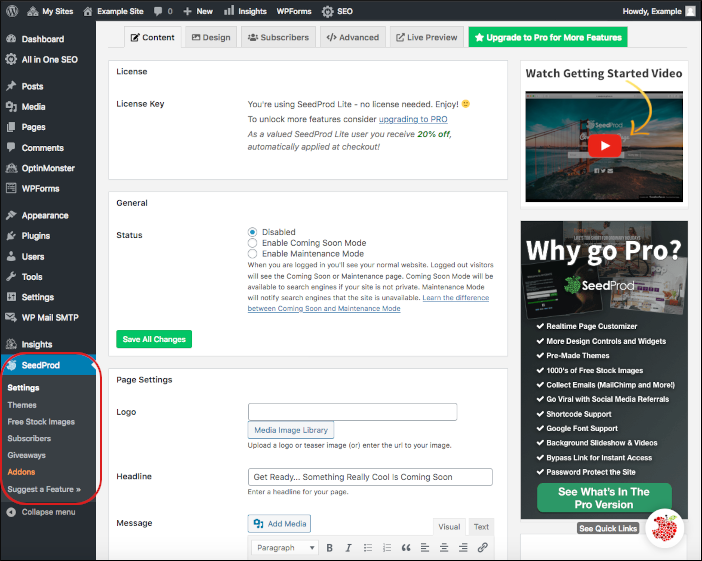
 This simple yet effective plugin’s settings are straightforward. Select Disabled, Enable Coming Soon Mode, or Enable Maintenance Mode from the plugin settings page. There are more advanced options available there as well, such as customizing and branding those pages.
For more information about this plugin, go to https://www.seedprod.com/docs/.
This simple yet effective plugin’s settings are straightforward. Select Disabled, Enable Coming Soon Mode, or Enable Maintenance Mode from the plugin settings page. There are more advanced options available there as well, such as customizing and branding those pages.
For more information about this plugin, go to https://www.seedprod.com/docs/.Managed hosting for WordPress powered by Rocket.net
Using the 'Coming Soon Page, Under Construction & Maintenance Mode' plugin on Webcentral Managed WordPress
Learn how to use the ‘Coming Soon Page, Under Construction & Maintenance Mode’ plugin for Webcentral Managed WordPress.
This plugin enables you to create a simple “Coming Soon Page, Under Construction or Maintenance Mode” page for your WordPress site. It allows you to work on your site privately while visitors see a “Coming Soon” or “Maintenance Mode” page.
With this plugin enabled, at the bottom of your WordPress dashboard in the left sidebar is the SeedProd option:
This simple yet effective plugin’s settings are straightforward. Select Disabled, Enable Coming Soon Mode, or Enable Maintenance Mode from the plugin settings page. There are more advanced options available there as well, such as customizing and branding those pages.
For more information about this plugin, go to https://www.seedprod.com/docs/.
This simple yet effective plugin’s settings are straightforward. Select Disabled, Enable Coming Soon Mode, or Enable Maintenance Mode from the plugin settings page. There are more advanced options available there as well, such as customizing and branding those pages.
For more information about this plugin, go to https://www.seedprod.com/docs/.