

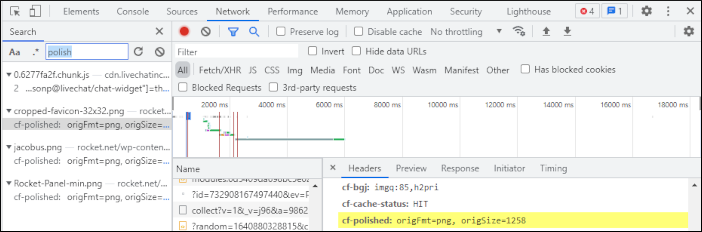
Will I see the .webp file type in WordPress or in the source code? In short, no. Because the optimizations are done in Cloudflare Enterprise, the source files are never changed, and the HTML is delivered unmodified. You can verify that Polish is working by viewing the HTTP headers for images loaded on your site. In the Chrome developer console, click the Network tab, and then load your site. Search for the word “polish” and then click one of the results:
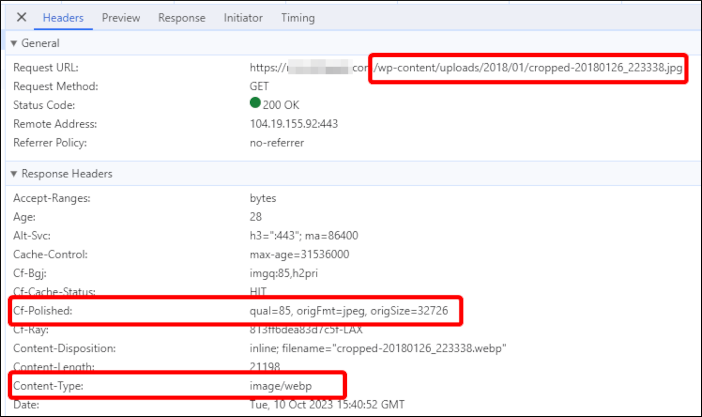
 Here is another example that shows the original file format and how Cloudflare’s Polish feature has modified the file at the edge:
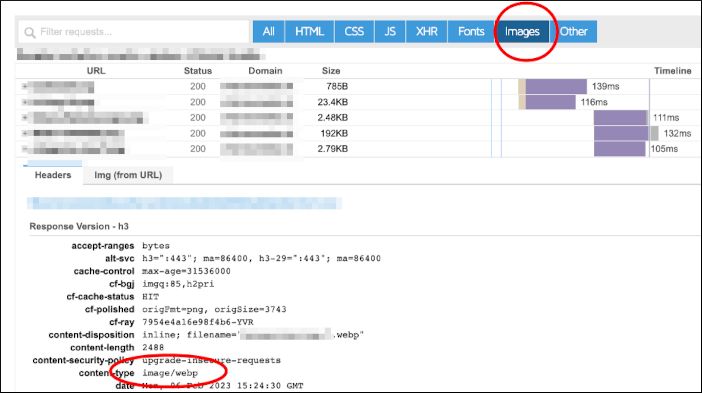
 You can also use the Waterfall view in GTMetrix.com to see the headers which will show which images are being served as WebP images:
 For more information about how Cloudflare’s Polish feature works, go to https://developers.cloudflare.com/images/polish.
Does this mean image size doesn’t matter?
No. You still need to be careful about not using excessively large images for your site. For example, uploading a full size image in the 10-20 Megapixel range will take a long time to download to a browser, even if it is optimized by Cloudflare. You should still resize images to web-friendly sizes before adding them to your WordPress site. Plugins such as Resize Image After Upload will do this for you, and are a worthwhile addition to your site.
Conclusion
There is no need to use an image optimization plugin, CDN, or other method of optimizing and serving sites faster. There is still a need to adhere to best practices with regard to image size, but nothing else is needed.
For more information about how Cloudflare’s Polish feature works, go to https://developers.cloudflare.com/images/polish.
Does this mean image size doesn’t matter?
No. You still need to be careful about not using excessively large images for your site. For example, uploading a full size image in the 10-20 Megapixel range will take a long time to download to a browser, even if it is optimized by Cloudflare. You should still resize images to web-friendly sizes before adding them to your WordPress site. Plugins such as Resize Image After Upload will do this for you, and are a worthwhile addition to your site.
Conclusion
There is no need to use an image optimization plugin, CDN, or other method of optimizing and serving sites faster. There is still a need to adhere to best practices with regard to image size, but nothing else is needed.