

About upgrades and downgrades
You can upgrade or downgrade your current plan to a plan that is compatible and available on our website. If you want to switch to a plan that is currently not listed on our website, please contact our support team at https://theconsole.webcentral.au.Upgrading your hosting plan
For some hosting products and services, you can upgrade your plan in the Hosting Panel. To see if your product supports this, follow these steps:- Log in to the Hosting Panel at https://theconsole.webcentral.au.
- In the left sidebar, under Products & Services, click Hosting & Servers:
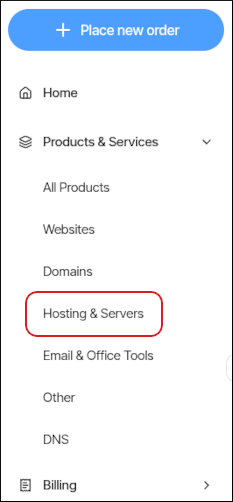
- On the Hosting & Servers page, locate the product or service you want to upgrade, and then click Manage.
- Click Upgrade.
- Review the options, and then click the product you want.
- Click Next.
- Review the product plan change, and then click Confirm Upgrade.