> ## Documentation Index
> Fetch the complete documentation index at: https://support.webcentral.au/llms.txt
> Use this file to discover all available pages before exploring further.

# How to Deploy a Node.js Application on Enhance

> This guide explains how to deploy a simple Node.js application on an Enhance-hosted website. It covers creating and uploading the application files, configuring SSH access, deploying the app using Enhance's Node.js deployment tool, installing dependencies, and verifying that the application is running successfully.

# 1. Log in to Enhance Control Panel

1. Navigate to **Websites**.
2. Click on the **desired domain name**.

# 2. Upload Your Application Files

1. Go to **Files**.

![](https://files.readme.io/537c1164fdd4430fbd895fa28c9baa2fae07a074b5a8f3def3af585cea3c33e6-image.png)

2. In your home directory, create a folder called:

```text theme={null}
my-app
```

3. Upload your application files into this folder.

![](https://files.readme.io/676979147b7ebf49e185ea0ab4835baee5b7a3ebc826eb48308e3399242a601d-image.png)

**index.js**

```js theme={null}
const express = require('express');
const app = express();

// Use PORT from environment or default to 3000
const PORT = process.env.PORT || 3000;

app.get('/', (req, res) => {
  res.send(`
    <!DOCTYPE html>
    <html>
      <head>
        <title>My Node.js App</title>
        <style>
          body {
            font-family: Arial, sans-serif;
            max-width: 600px;
            margin: 80px auto;
            text-align: center;
          }
          h1 { color: #2c7be5; }
          .badge {
            background: #e8f4fd;
            padding: 8px 16px;
            border-radius: 20px;
            font-size: 14px;
          }
        </style>
      </head>
      <body>
        <h1>🚀 Node.js App is Running!</h1>
        <p class="badge">Hosted on Enhance</p>
        <p>Server time: ${new Date().toLocaleString()}</p>
        <p>Node version: ${process.version}</p>
      </body>
    </html>
  `);
});

app.get('/health', (req, res) => {
  res.json({
    status: 'ok',
    uptime: process.uptime()
  });
});

// Listen on all interfaces (required for proxying)
app.listen(PORT, '0.0.0.0', () => {
  console.log(`App running on port ${PORT}`);
});
```

**package.json**

```json theme={null}
{
  "name": "demo-node-app",
  "version": "1.0.0",
  "description": "A simple Node.js demo app for Enhance hosting",
  "main": "index.js",
  "scripts": {
    "start": "node index.js"
  },
  "dependencies": {
    "express": "^4.18.2"
  }
}
```

# 3. Connect via SSH

If you don't know the SSH password, you can reset it:

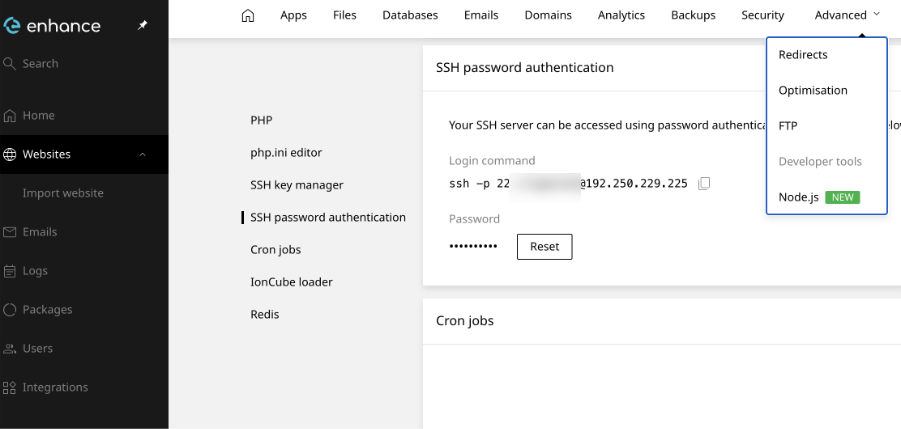
1. In Enhance CP, go to:

* **Websites**
* Select your **domain**
* **Advanced**
* **Developer Tools**
![](https://files.readme.io/91f1d9197cf4920cfa4c86fa0505976583eb97fa496322f65d87f657cb2f1209-image.png)

2. Scroll down to SSH Password Authentication.
3. Click Reset and set a new password.

**SSH Example**

```text theme={null}
ssh -p 22 username@192.250.229.225
```

Once connected:

```text theme={null}
username@s4515:~$ ls

my-app  public_html
```

Navigate to your application directory:

```text theme={null}
username@s4515:~$ cd my-app
```

# 4. Deploy the Application

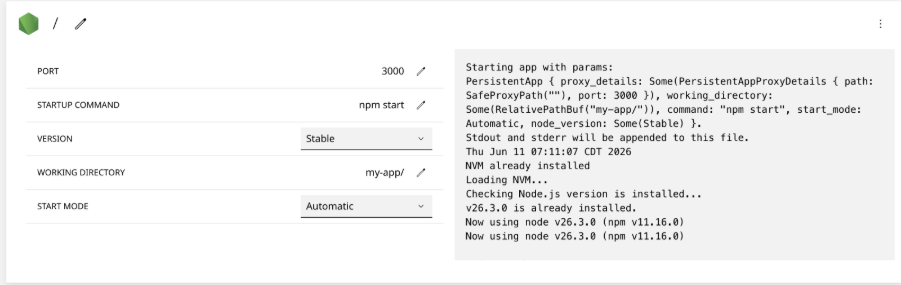
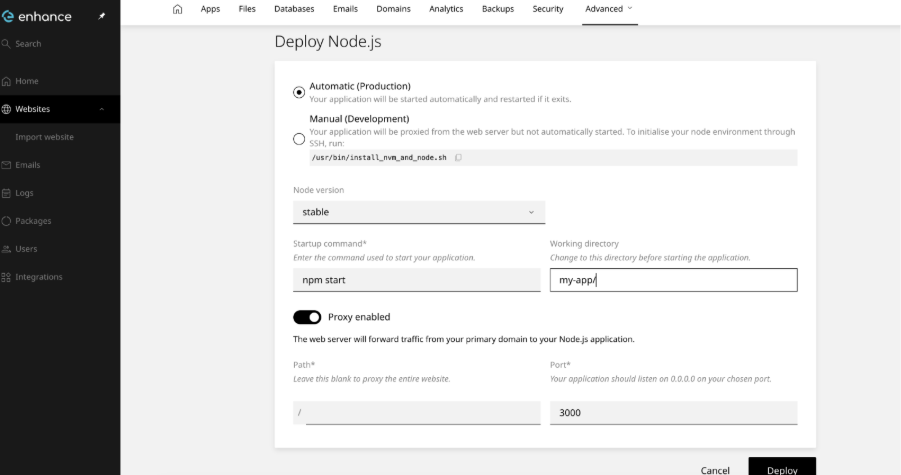
Return to the Enhance Control Panel and deploy the application using the Deploy Node.js tool.
![](https://files.readme.io/1821203580d3e41a4656e322a0926bdd34b3d792371e89ff50f58a6ca2c9c25f-image.png)

Configure the deployment according to the deployment screen and point it to your `my-app` directory.

# 5. Install Dependencies

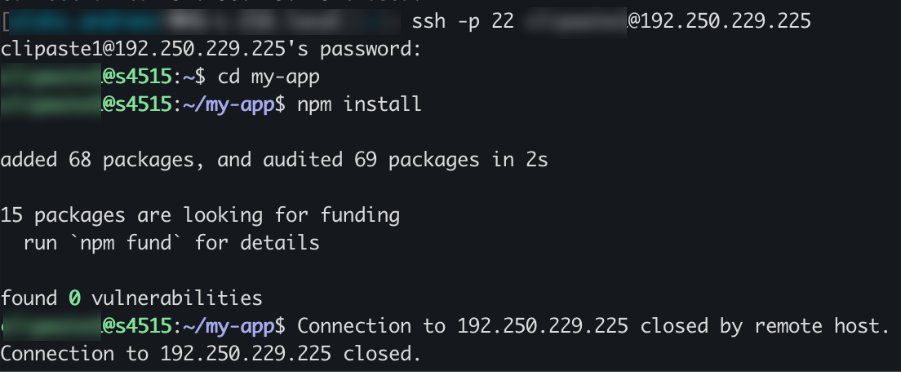
After the deployment has been created, return to your SSH session and run:

```text theme={null}
npm install
```

```text theme={null}
run `npm fund` for details
```
![](https://files.readme.io/dc75a902d3948adb396c2af7fb73b167f04ffeb6d0efc5325b1e11166e7e6796-image.png)

Your Node.js application should now be successfully deployed on Enhance

![](https://files.readme.io/fa0a31ba3c2bb44e9ee5045adb7ae8764245c989b6b5354d2796538d7139c228-image.png)

![](https://files.readme.io/14d70b9205664f23543400cd3f6b2b84af7c6f76493d81c7ff5695eb01cb2caf-image.png)